
Summary
Editor's rating
Is it worth the money?
Design and mounting: solid body, annoying stand
Everyday use: plug-and-play is nice, but it’s not exactly carefree
Build quality and how tough it feels
Image quality and 4K60 performance in real use
What this ELP camera actually is (and what it isn’t)
Pros
- Sharp 4K60 image with smooth motion over USB 3.0 and HDMI
- Simultaneous HDMI + USB output is very handy for streaming and monitoring
- Solid aluminium body with standard 1/4" thread for tripods and mounts
Cons
- Included stand/mount is awkward and unstable for typical monitor use
- No built-in microphone, so you must manage separate audio
- Wide 120° lens can be too wide for single-person desk use without cropping

Specifications
View full product page →| Brand | ELP |
A 4K webcam that feels more like a tiny studio camera
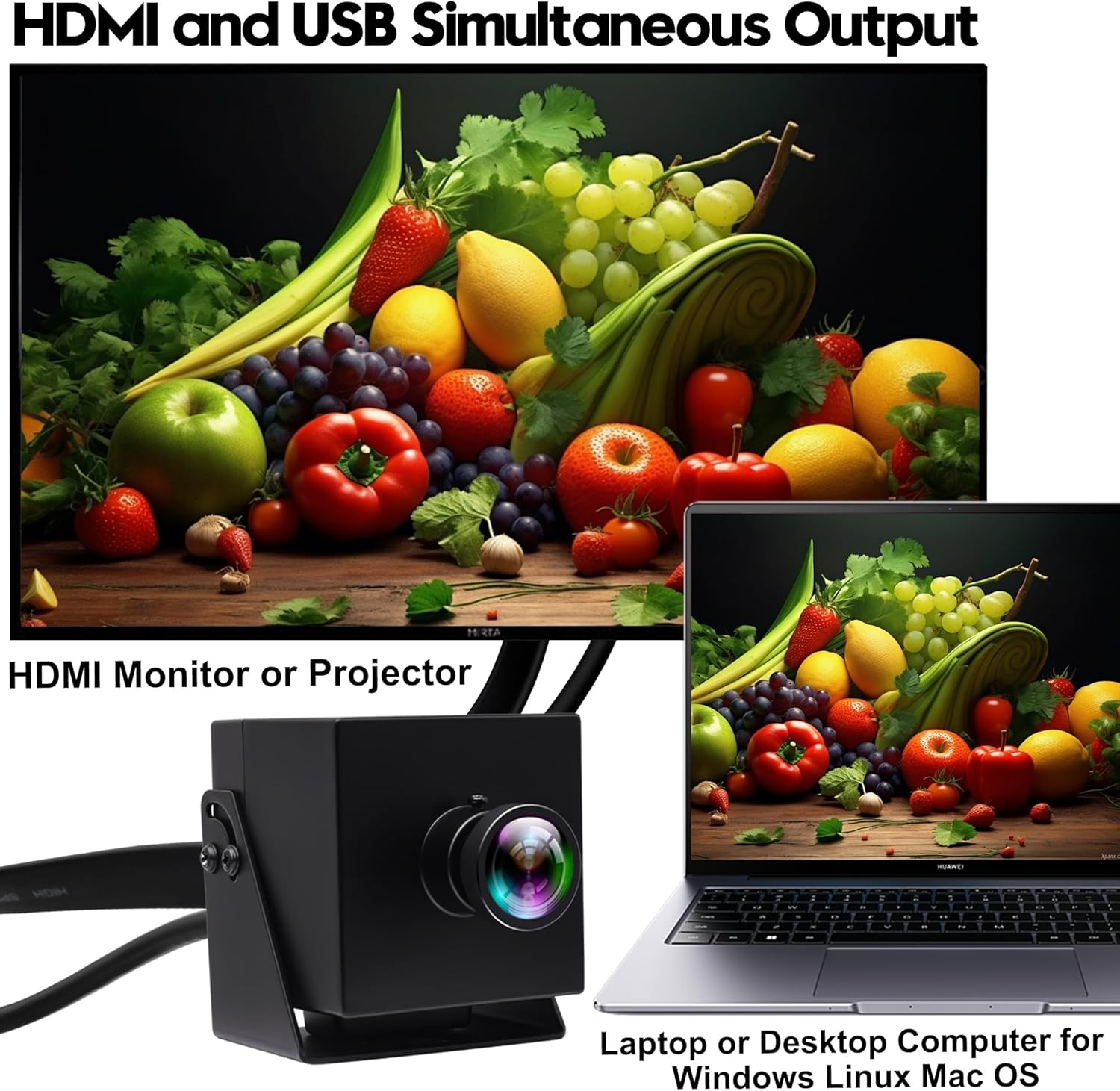
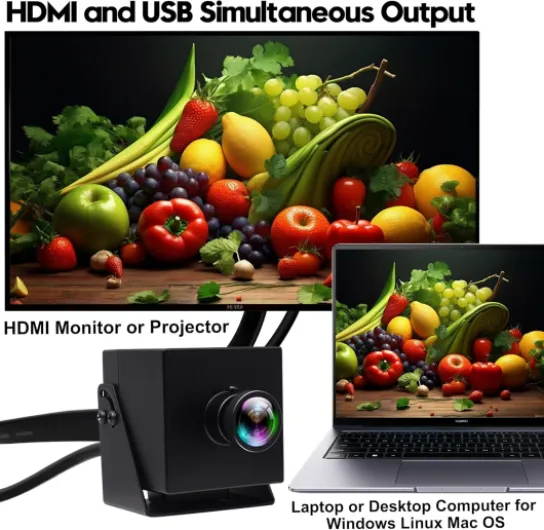
I’ve been using this ELP 60fps HDMI USB camera for a little while as my main webcam and also as a small camera for a secondary monitor setup. If you’re expecting a cute little plastic webcam you clip on top of your screen and forget about, that’s not what this is. It’s more like a compact box camera that just happens to act like a webcam when you plug it in via USB. HDMI and USB working at the same time is the main thing that pushed me to try it.
In practice, I’ve run it both into my PC via USB 3.0 and into a 4K monitor via HDMI. Windows picked it up straight away as a UVC device, no drivers, no weird software. OBS, Zoom and Teams all recognised it instantly, so from that side, it really is plug and play. On the HDMI side, my monitor just treated it like any other 4K source. No menu diving needed, which I appreciated because I hate fiddling with drivers and dodgy apps.
The big selling points on paper are: 4K at 60fps, USB + HDMI simultaneous output, and a 120° wide-angle lens with low distortion. In real life, those claims mostly hold up. The image is sharp, motion is smooth, and you do get a very wide field of view without that heavy fisheye curve. But there are trade-offs: no built-in microphone, fixed focus, and the mount is honestly a bit annoying if you want to just use it like a normal desktop webcam.
Overall, my first impression is that it’s a pretty solid niche camera. It makes more sense for streaming, presentations, rooms, or events than for someone just doing casual video calls. If you only need a simple webcam, there are cheaper and easier options. If you want something that behaves more like a little studio camera with 4K60 and HDMI, then it starts to make sense.
Is it worth the money?
Price-wise, this camera sits in that awkward middle zone. It’s more expensive than a typical 1080p webcam from Logitech or similar brands, but cheaper than some dedicated 4K HDMI box cameras and way cheaper than a proper mirrorless camera plus capture card. If you only ever use it as a basic webcam for Teams calls, then honestly, it’s overkill and not great value. A good 1080p webcam with a built-in mic will cost you less and be easier to mount.
Where the value starts to make sense is if you actually use what you’re paying for: 4K60, HDMI + USB simultaneous output, and the wide 120° lens. For example, if you’re streaming and want to send HDMI to a confidence monitor or projector while also sending USB to your PC, this solves that in one box. Same for churches, classrooms, or conference rooms where someone wants to see the feed on a TV and stream it at the same time. In those cases, the price feels more reasonable because you’d otherwise need extra gear or multiple devices.
Compared to a DSLR or mirrorless setup, you obviously lose sensor size, interchangeable lenses (even though this one hints at some adjustability), and depth of field, but you also avoid dealing with batteries, overheating warnings, and HDMI capture cards. It’s just one cable to the PC and one to the screen. For some people, that simplicity is worth more than having "cinematic" background blur.
So in my view, the value is decent but not mind-blowing. If you fit the target use case (streaming, presentations, small events, or needing HDMI + USB at once), it’s a practical tool that gets the job done. If you’re just replacing a cheap webcam for home office calls, you’re paying for features you’ll never use and you’ll probably be happier with something cheaper and easier to mount.
Design and mounting: solid body, annoying stand
Design-wise, the camera is pretty basic and functional. No fancy curves, no RGB, no glossy plastic. It’s basically a small rectangular block with the lens on the front, USB and HDMI on the back, and a 1/4" screw thread on the bottom. I actually like that it doesn’t scream "gadget". On a desk or mounted near a TV, it just blends in as another little black box.
The body is aluminium, and it feels tough. There’s a bit of weight to it for the size, which is good because it doesn’t move every time you bump the cable. It doesn’t feel like cheap hollow plastic. I’ve unplugged and replugged the USB and HDMI multiple times and the ports still feel tight, not wobbly. It’s compact enough that you can throw it in a bag with a laptop and two cables and you’ve basically got a portable 4K camera setup.
Now the weak point: the included metal stand/mount is pretty bad if you want to use it like a normal webcam on top of a monitor. It’s more of a basic plate with a hinge than a proper clip. You can screw the camera on it and rest it on a surface, but getting it stable and at the right angle on a thin monitor bezel is a pain. One of the French reviewers on Amazon pretty much said it’s almost unusable as-is, and I get that. I ended up putting it on a cheap tripod and later on a proper monitor-mount arm. With that, it becomes much more practical.
So my view on the design is: camera body is solid, mount is half-baked. If you already have a tripod, magic arm, or some kind of desk mount with a 1/4" screw, you’ll be fine. If you’re hoping to just clip it on your laptop screen like a Logitech, you’re going to be disappointed and probably swear a bit while trying to balance it. For the price, they really could include a better, more flexible mount.
Everyday use: plug-and-play is nice, but it’s not exactly carefree
In terms of day-to-day comfort, it’s a mixed bag. Setup is easy: plug in the USB 3.0 cable, and that’s it. No drivers, no registration, no bloated "camera suite" software. It showed up in Zoom, Teams, Discord, and OBS without me touching any settings. That part I really liked, especially compared to some brands that force you through their app just to change basic stuff.
Where it gets less comfortable is the overall handling and ergonomics. Because of the wide-angle lens, you need to think a bit about where you place it. On a desk right under the monitor, it will show a lot of ceiling and a lot of your messy background. I had to raise it on a tripod, tilt it down, and sometimes crop in software to get a framing I was happy with. If you’re used to a regular 70–90° webcam that you just plonk on top of the screen and forget about, this will feel more fiddly at first.
The lack of built-in microphone is another comfort hit if you’re used to all-in-one webcams. For me it’s not a big deal because I always use a USB mic or a headset, but if you were hoping to just plug one device and be done, this is not it. You must manage audio separately in your software and on your calls. Once it’s set up it’s fine, but it’s one more thing to think about.
On the positive side, once I had it on a proper mount and my audio sorted, it behaved very predictably. No autofocus hunting, no random exposure jumps, it just sits there and does its job. Heat and noise weren’t an issue; it gets slightly warm after long sessions, but nothing worrying and there’s no fan noise. So from a comfort point of view: setup is straightforward, but you need to invest a bit of effort in mounting and audio if you want a clean, hassle-free workflow.
Build quality and how tough it feels
From a durability angle, this camera gives a better impression than most plastic webcams I’ve used. The aluminium body feels sturdy, and after a bunch of plugging/unplugging and moving it between rooms, nothing rattles or feels loose. I’ve accidentally knocked it over on the desk a couple of times, and apart from a small mark on the stand, the camera itself didn’t care. It really feels more like a small industrial camera than a fragile consumer gadget.
The connectors (USB-C on the camera side, HDMI) feel solid. I don’t get that wobbly, "this port will die in a month" sensation you get on some cheap gear. The included cables are decent thickness and haven’t frayed or loosened at the ends. Obviously, I haven’t used it for years, but over a few weeks of regular handling it still looks and behaves like new. No weird flickers, no intermittent signal drops, nothing like that.
There’s no water resistance, so this is not something you’d want to leave outdoors or near splashes. It’s clearly meant for indoor use: desks, meeting rooms, churches, classrooms, that kind of thing. Temperature-wise, it does get warm when running 4K60 for long sessions, especially when outputting USB and HDMI at the same time, but not to the point where I’d worry about lifespan. The metal body probably helps dissipate heat better than a plastic shell would.
The only durability concern I can see long term is the mounting hardware. The included stand is basic and not very confidence-inspiring if you constantly adjust it or move it between monitors. The 1/4" thread on the camera itself is fine, but I’d honestly plan to use a better third-party mount or tripod for serious setups. In short, the camera body and ports feel like they’ll last; the bundled stand feels like the weak link.
Image quality and 4K60 performance in real use
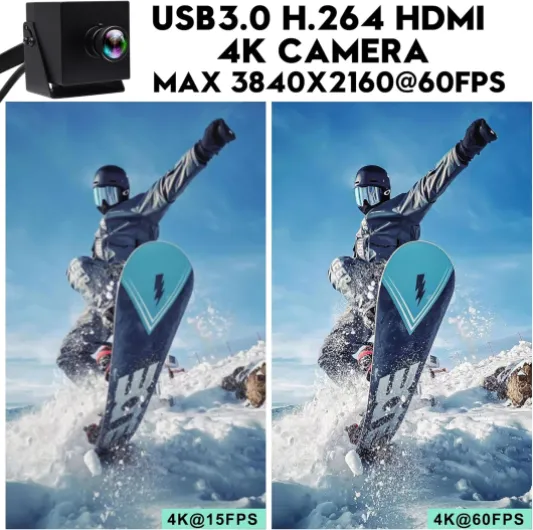
On the performance side, this is where the camera actually delivers. Over USB 3.0, I was able to get 3840×2160 at 60 fps in OBS using MJPEG and H.264, just like the product page says. Motion is smooth, and there’s no obvious stutter or dropped frames as long as your USB port can handle it and your PC isn’t ancient. For normal video calls, I ended up running it at 1080p60 most of the time just to save resources, but it’s nice knowing full 4K60 is there when you need it.
The image is sharp and you can clearly see small text on a whiteboard or details in the background. Dynamic range is decent for a webcam-style camera; bright windows will still blow out, but not worse than most webcams I’ve used. Low light performance is okay but not magic: in a dim room it gets grainy, like any small sensor. With a basic desk lamp or softbox, it looks a lot better. There’s no autofocus, but the fixed focus seems tuned well for typical distances (roughly 0.5–3 meters). For talking-head shots at a desk, it was consistently in focus. If you bring objects very close to the lens, they won’t be super sharp, so don’t expect macro shots.
The 120° wide-angle is both a strength and a limitation. For a small room, classroom, or group in front of a TV, it’s great because you capture a lot of space. Lines stay fairly straight; you don’t get that extreme bubble effect, though people at the very edges still look a bit stretched, which is normal for this kind of lens. For a single person at a desk, it might actually be too wide unless you crop in software. I often used OBS to crop the sides so I wasn’t showing half my room.
HDMI output also worked well. I tested 4K60 directly into a 4K TV and a 4K monitor, and latency was very low – perfectly usable to monitor yourself in real time. Running USB + HDMI simultaneously didn’t break anything; the camera handled both without obvious overheating or frame drops during my sessions (about 1–2 hours at a time). Overall, performance is pretty solid for the price if you actually need 4K60 and the wide view. If you just do Zoom calls in 720p, this is clearly overkill.
What this ELP camera actually is (and what it isn’t)
This thing is sold as a "webcam", but in use it feels more like a compact industrial or streaming camera. The core idea is simple: one small box that can output 4K60 over both USB 3.0 and HDMI at the same time. You can run it as a regular webcam into your computer, and in parallel send the same feed to a TV, projector, or capture card. For me, that’s the main reason to consider it over a standard USB webcam.
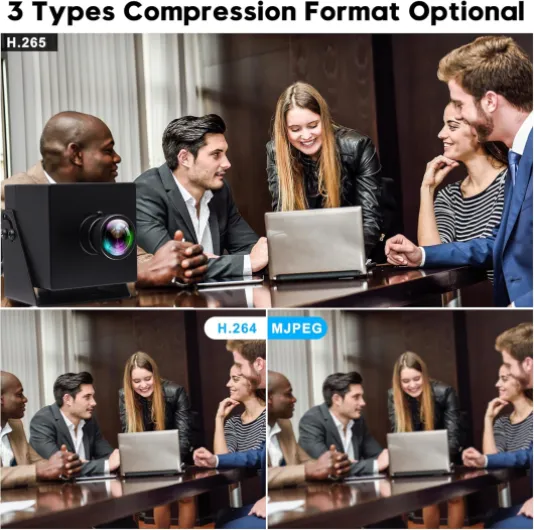
Specs-wise, it’s got an 8 MP CMOS sensor, supports up to 3840×2160 at 60 fps, and can output in H.264, MJPEG, or YUY2. Focus is fixed, so there’s no autofocus motor hunting back and forth. The lens is a 120° wide-angle with claimed "no distortion". In reality, there is still some perspective stretch at the edges (that’s just how wide lenses work), but it’s nowhere near a full fisheye. Aspect ratio is standard 16:9, so it fits normal monitors and streaming layouts without black bars.
In the box you get:
- the camera itself (metal body),
- a 1.2 m USB-C to USB-A cable,
- a 1.5 m HDMI cable,
- a small metal stand,
- and a 1/4" thread for tripods.
In day-to-day use, the camera shows up like any other UVC webcam on PC, laptop, or even Android (with the right adapter). I tested it on Windows and a Raspberry Pi; both recognised it without extra drivers. So from a "does it just work" perspective, it’s decent. Just keep in mind what it isn’t: it’s not a cute conference webcam with speakers, AI framing, or a bunch of software effects. It’s a simple, fairly serious image box that expects you to handle audio and mounting yourself.
Pros
- Sharp 4K60 image with smooth motion over USB 3.0 and HDMI
- Simultaneous HDMI + USB output is very handy for streaming and monitoring
- Solid aluminium body with standard 1/4" thread for tripods and mounts
Cons
- Included stand/mount is awkward and unstable for typical monitor use
- No built-in microphone, so you must manage separate audio
- Wide 120° lens can be too wide for single-person desk use without cropping
Conclusion
Editor's rating
Overall, the ELP 60fps HDMI USB 4K camera is a solid little workhorse if you actually need what it offers: 4K at 60 fps, simultaneous HDMI and USB output, and a wide 120° lens in a compact metal body. Image quality is sharp, motion is smooth, and setup is refreshingly simple – plug it in and it shows up like any standard webcam. For streaming, presentations, classrooms, or church services where you want to feed both a PC and a TV/projector, it makes a lot of sense.
It’s not perfect though. The included stand is borderline useless if you want to use it like a normal webcam on top of a monitor, and there’s no built-in microphone, so you’ll definitely need external audio. The wide-angle lens is great for rooms but can be too wide for a single person at a desk unless you crop. And for simple home office calls, the price is hard to justify when cheaper 1080p webcams will do the job with less hassle.
If you’re a streamer, a small venue, or someone who likes tinkering with multi-screen setups, this camera is pretty good value and gives you a lot of flexibility without extra capture cards or fancy software. If you just want a plug-and-forget webcam with a mic for Zoom, you should skip this and get something simpler and cheaper.