
Summary
Editor's rating
Value for money: strong features, but system costs add up
Chunky, practical design that feels like a proper tool
Battery life and charging: solid endurance, slightly annoying accessories situation
Build quality and long-term feel: built like a tank, but heavy
Autofocus, video, and real-world speed: strong overall with a few quirks
What this camera actually offers on paper (and what that means in real life)
Pros
- Strong video features: 5.1K open gate, 4K 120p 10-bit, internal 5.8K ProRes RAW HQ
- Robust build quality with great EVF and very usable tilt+flip rear screen
- Much improved phase hybrid AF and very effective in-body stabilization
Cons
- Heavy body and relatively expensive ecosystem (CFexpress cards, L-mount lenses)
- No USB-C cable or charger included, and colors can feel a bit red out of the box for video users coming from Sony

Specifications
View full product page →| Brand | Panasonic |
A serious hybrid body that actually feels built for work
I’ve been using the Panasonic LUMIX S1II for a few weeks now, mainly for client video work and some casual photo jobs on the side. I came from a Sony A7 IV and occasionally borrow a Sony A1, so I’m not new to full-frame mirrorless. I grabbed the S1II mostly out of curiosity for the internal ProRes RAW, the new phase hybrid AF, and because I wanted to see if Panasonic finally fixed the autofocus complaints from the older S-series bodies.
Right away, my first feeling was: this thing is a proper work tool, not a toy. It’s big, heavy, and clearly aimed at people who are fine carrying a chunky body if it means better handling and more direct controls. If you’re looking for something tiny to throw in a handbag, this is not it. But if you’re used to DSLR-sized bodies, the grip and the control layout make sense fast.
I used it on a small corporate shoot (interviews + some handheld b‑roll) and for a couple of evening street walks. I shot mostly in 4K 50/60p and some 5.1K open gate, plus a bunch of stills in RAW. I didn’t bother with any fancy rigs except a small cage and an SSD for some of the ProRes RAW tests. My main lenses were a Sigma 28–70 f/2.8 and the Sigma 150–600 for a bit of wildlife-style testing.
Overall, it feels like a camera made by engineers who actually listen to working shooters: lots of custom modes, a good EVF, proper IBIS, and serious codecs. It’s not perfect and definitely not cheap once you factor in CFexpress cards and lenses, but it does feel like a solid hybrid body for people who care more about features and reliability than shaving off 200 grams of weight.
Value for money: strong features, but system costs add up
Talking about value, you have to look beyond just the body price. The S1II itself isn’t cheap, but for what it offers – internal ProRes RAW, 5.1K open gate, strong IBIS, a great EVF, and a solid AF system – it’s fairly reasonable compared to high-end hybrids from Sony, Canon, or Nikon. If you’re a video-heavy shooter who will actually use ProRes RAW and the higher-end codecs, the body starts to look like a good deal. If you only ever shoot basic 4K and simple photo jobs, a cheaper body like the S5II or a competitor might make more sense.
Where the costs creep up is media and lenses. To really use the ProRes RAW and higher bitrate modes, you’ll want fast CFexpress Type B cards or a reliable USB‑C SSD. Those aren’t cheap. L‑mount glass is better than it used to be thanks to Sigma, but it’s still not as deep or as budget-friendly as Sony E‑mount. You can build a decent kit with Sigma zooms and primes without going broke, but if you want native Panasonic lenses or long wildlife glass, the bill climbs quickly. Also, remember you don’t get a USB charger or cable in the box, so you might end up buying those too.
For someone who makes money from video and needs a hybrid camera that leans heavily towards video work, the S1II offers good value because it replaces a separate external RAW recorder and cuts down on rig complexity. For a pure hobbyist who mostly shoots JPEGs and casual clips, it’s probably overkill, and you’re paying for features you won’t touch. The user reviews are mostly positive (around 4.6/5), which matches my feeling: strong camera overall, but not perfect and not the cheapest ecosystem to buy into.
So, from a value perspective, I’d say: good value if you’ll actually use the advanced video tools and need a robust body, average value if you’re just looking for a nice full-frame camera for everyday shooting. There are cheaper options that will give you similar stills quality if you don’t care about ProRes RAW, open gate, or the more serious video functions.
Chunky, practical design that feels like a proper tool
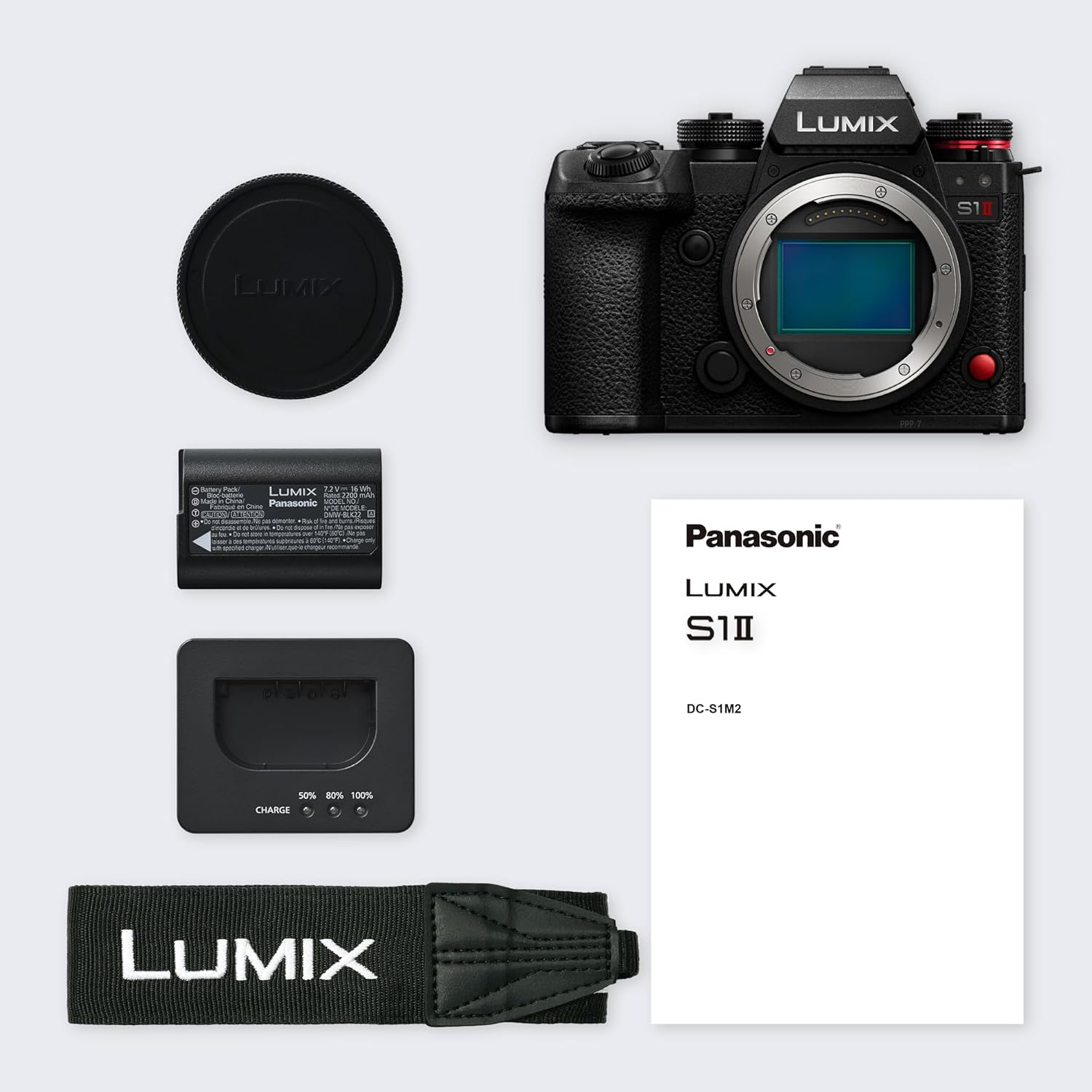
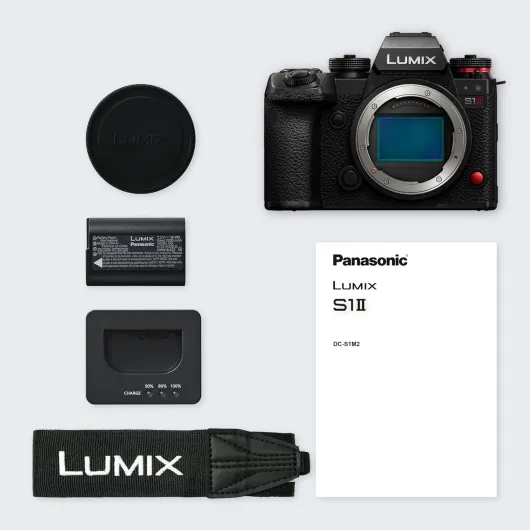
Design-wise, the S1II is on the big and heavy side for a mirrorless body. At around 800 grams just for the body, it’s closer to an old DSLR than a compact mirrorless like the S5 series. Personally, I actually liked that. With bigger lenses like a 24–70 f/2.8 or the Sigma 150–600, the camera feels balanced and secure in the hand, not front-heavy. The grip is deep, the thumb rest is decent, and the buttons are spread out in a way that makes sense once you spend a day with it. If you have small hands, you might find it a bit bulky, but for me with medium/large hands it felt natural.
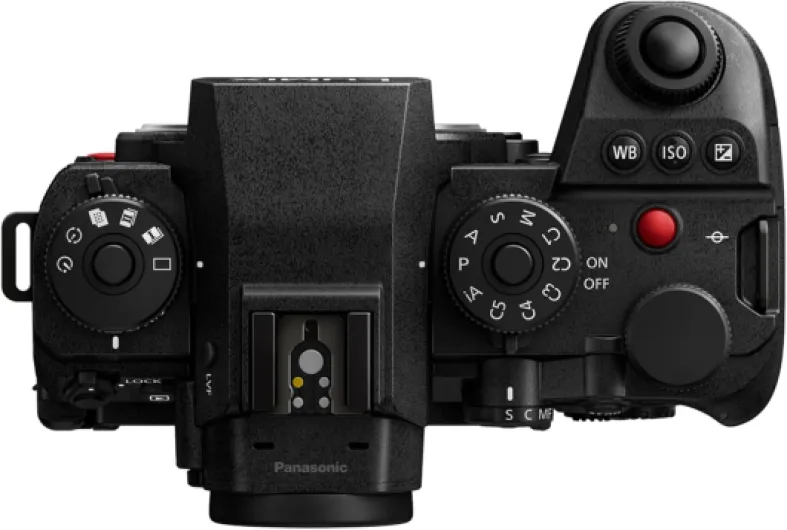
The control layout is one of the strong points. You get dedicated photo/video/S&Q mode separation, plenty of custom modes (C1–C5), and a good number of physical buttons that are all reassignable. That makes it easy to set up proper photo and video profiles and jump between them without digging into menus every time. Compared to my Sony A7 IV, I found the Panasonic layout more straightforward once configured. The top plate is clean enough but still has the key dials and buttons where you’d expect them, and the on/off switch is easy to reach even when you’re holding the camera one‑handed.
The EVF is honestly one of the highlights. It’s a 5.76M‑dot OLED with up to 120 fps refresh, and it looks very clear and sharp. I never felt like I was fighting lag or pixelation when tracking moving subjects. It’s not miles ahead of the best EVFs from Sony or Nikon, but it’s in that high-end zone where you stop thinking about it and just use it. The rear screen is 3" with 1.84M dots and a tilt + fully articulating mechanism. That combo is great: you can tilt it up/down for stills like a classic DSLR, or flip it fully around for video and selfie work. Personally, I prefer this over pure flippy screens.
On the downside, the screen could be slightly larger and brighter. It’s usable in daylight, but coming from some newer cameras with brighter panels, you feel it. Also, the body is clearly built like a tank, which is good for durability but not for discreet shooting. If you want a small, low-profile camera for travel or street, this isn’t subtle. It looks and feels like a “serious” camera, which can be a pro or a con depending on how and where you shoot.
Battery life and charging: solid endurance, slightly annoying accessories situation
Battery life on the S1II is decent to good, especially considering the heavy video features. Using the camera for a mix of 4K 50/60p recording, some 5.1K open gate tests, plus stills throughout the day, I could get through a light shooting day on one battery if I was careful, but realistically I felt safer with two. For pure photo work, one battery lasted me a full afternoon of shooting without stress. For heavy video (interviews + b‑roll), I swapped to a second battery by mid/late day. So it’s not battery-hungry in a scary way, but you shouldn’t rely on a single battery if you’re doing paid work.
Panasonic’s universal USB‑C charging approach is a double-edged sword. On the positive side, being able to charge and power the camera via USB‑C from a power bank or laptop charger is very handy. On a long day, I plugged a USB‑C PD power bank into the camera while it was on a tripod and basically used it like a semi‑fixed camera without worrying about the battery meter. For travel, it’s also nice not to carry a separate proprietary charger if you don’t want to.
The annoying part: no USB cable or AC adapter in the box. I get the environmental reasoning, but for a camera in this price range, it feels a bit cheap from a user standpoint. If you already have good USB‑C PD chargers and cables, fine. If not, you’ll end up buying extra gear on top of the camera and CFexpress cards. Not a dealbreaker, but something to factor in. Also, charging over USB‑C is convenient, but I still prefer using a dedicated external charger to rotate batteries while I’m shooting. If you shoot long days often, I’d recommend buying at least one extra battery and an external charger instead of relying only on in‑body charging.
In day‑to‑day use, I’d rate the battery situation as perfectly workable but nothing special. It doesn’t feel particularly better or worse than similar full-frame hybrids from Sony or Nikon. The main difference is just Panasonic’s choice to lean on USB‑C without bundling a charger. If you’re already living the USB‑C life with plenty of chargers around, you’ll adapt quickly. If not, it’s one more small cost and a minor annoyance after unboxing.
Build quality and long-term feel: built like a tank, but heavy
The S1II gives off a very rugged, professional vibe. The body feels dense and solid, with no creaks or flex when you twist it a bit in your hands. Buttons and dials have a firm, positive click, and nothing feels loose or toy-like. I used it in light rain, some dusty paths, and a couple of cold evenings, and it didn’t flinch. Weather sealing isn’t something you can easily test to the limit without being reckless, but based on the feel and Panasonic’s track record with the S line, I’d be fairly confident using it in rougher conditions, as long as you’re not totally careless.
The ports and doors feel well put together. The card door has a solid latch, the rubber covers for USB‑C and HDMI don’t feel like they’ll tear off after a few months, and the CFexpress/SD slot area closes tight. The hot shoe and tripod mount area both feel sturdy. I mounted a fairly heavy cage and accessories on it for one shoot (monitor, mic, SSD), and the camera took the load without complaining. The big, chunky body actually helps here – it doesn’t feel like you’re overloading a tiny shell.
On the downside, that same robustness means weight. If you’re walking around all day with this plus a fast zoom, your neck and shoulders will notice it. For studio or planned shoots, that’s not a big deal. For pure travel or casual street photography, it’s a bit of a pain compared to smaller bodies like the S5 series or APS‑C options. Also, if you’re putting it on a smaller gimbal, you’ll be closer to the limits of what the gimbal can comfortably handle, especially with heavier lenses.
So, in terms of durability and build, I’d say it’s pretty solid and confidence-inspiring. It feels like a body you can keep for years and not baby all the time. If your priority is compact and lightweight, though, you might find it overkill. This is more of a main workhorse body than a casual weekend camera that you toss in a small bag without thinking about it.
Autofocus, video, and real-world speed: strong overall with a few quirks
In terms of autofocus and general speed, the S1II is a big step up from older contrast‑AF Lumix bodies. The 779‑point phase hybrid AF finally puts Panasonic in the same conversation as Sony, Canon, and Nikon. In real use, I’d say it sits slightly behind the best from Sony and Nikon for pure subject tracking speed, but it’s completely usable now for most scenarios. For talking head video, events, and casual street, it locked on and stayed there. With wildlife (I tried birds with the Sigma 150–600), it did a decent job, though not quite at Nikon Z8 / Sony A1 level. Subject detection for humans and animals is reliable, and the camera doesn’t hunt as much as older Panasonics.
Where the camera really shines is video performance. Being able to shoot 4K/C4K 120p 10‑bit internally with good detail and 5.1K 60p open gate is very useful. Open gate is great if you deliver for different aspect ratios (16:9, 9:16, 1:1) because you can frame once and crop later. Internal 5.8K ProRes RAW HQ to CFexpress or USB‑SSD is the big selling point for a lot of people. I tested ProRes RAW on a fast CFexpress card, and the files are heavy but flexible in grading. It’s not something you use for casual clips, but for higher-end projects or when you need maximum latitude, it’s nice to have without an external recorder hanging off the camera.
The image stabilization is rated for about 8 stops, and in real life it’s very solid. Handheld walking shots at 24–35mm look smooth enough for many uses, especially if you add a tiny bit of stabilization in post. For photos, you can shoot at pretty slow shutter speeds and still come away with sharp images if your subject isn’t moving too much. It’s not magic – you’ll still see wobble with long lenses or fast side-to-side movement – but it helps a lot. Combined with the good dynamic range, you get clean handheld footage even in lower light.
The only performance downsides I noticed: the AF isn’t quite on par with top Sony/Nikon bodies for fast wildlife and erratic sports, and the colors out of camera lean a bit towards red, especially in video. Coming from Sony, I had to tweak my LUTs and grading approach a bit, because skin tones and overall balance felt different. It’s not “bad”, just different, and if you like Panasonic’s look, you’ll be fine. Rolling shutter is present in some modes (like most cameras), but not horrible. Overall, the performance is pretty solid and more than good enough for most professional hybrid work.

What this camera actually offers on paper (and what that means in real life)
On paper, the LUMIX S1II is a 24.1 MP full-frame mirrorless with a partially stacked CMOS sensor, L‑mount, and a long list of video specs. The headline stuff: 5.1K 60p open gate, 4K/C4K up to 120p 10‑bit, internal 5.8K Apple ProRes RAW HQ to CFexpress Type B or USB SSD, and up to 15 stops of dynamic range according to Panasonic. For photos, you get 24 MP stills, a 96 MP high-res mode, and 70 fps burst with the electronic shutter (with AF/AE depending on mode). It also brings 779‑point phase hybrid AF with subject detection, including some AI-based recognition for humans and urban sports.
In practice, the main thing that stands out is how video-focused this body is. The codec options are generous, you can shoot open gate 5.1K for flexible reframing or multi‑format social output, and the camera doesn’t feel like it’s constantly throttling you with short recording limits. It’s clearly designed with solo creators, small crews, and hybrid shooters in mind. Being able to record ProRes RAW internally without needing an external recorder is a big deal if you usually carry around an Atomos or similar. It simplifies the rig and makes a small gimbal setup more realistic.
On the stills side, 24 MP is nothing special in 2026, but it’s honestly enough for most work: events, weddings, corporate, and even wildlife if you’re okay cropping a bit. The plus side of “only” 24 MP is better noise performance and lighter files, which helps when you’re shooting bursts or long days. If you’re the type who prints huge or crops heavily, you might find it limiting compared to 45‑60 MP bodies, but I didn’t feel held back for typical jobs.
The one thing that feels a bit outdated on paper is some of the connectivity and port choices. HDMI is still 1.4 and not full‑fat 2.1, which is a bit annoying for external monitoring / high‑frame-rate workflows. Also, Panasonic is pushing USB‑C universal charging but doesn’t include a USB cable or AC adapter, which is fine for the environment but slightly annoying when you drop this kind of money and then have to dig around for spare cables. Overall, though, the spec sheet matches a serious hybrid camera that is clearly geared toward people doing more video than casual vacation snaps.
Pros
- Strong video features: 5.1K open gate, 4K 120p 10-bit, internal 5.8K ProRes RAW HQ
- Robust build quality with great EVF and very usable tilt+flip rear screen
- Much improved phase hybrid AF and very effective in-body stabilization
Cons
- Heavy body and relatively expensive ecosystem (CFexpress cards, L-mount lenses)
- No USB-C cable or charger included, and colors can feel a bit red out of the box for video users coming from Sony
Conclusion
Editor's rating
The Panasonic LUMIX S1II is a strong hybrid camera that clearly leans toward serious video use, with enough photo capability to handle most professional stills jobs. The big positives for me are the internal 5.8K ProRes RAW, the 5.1K open gate recording, the solid 4K 120p, the very good EVF, and the robust build. Autofocus is finally in a good place for Panasonic, and while it’s not quite at the level of the top Sony or Nikon sports bodies, it’s more than usable for events, portrait work, and a fair amount of wildlife if you’re realistic about what you’re shooting.
It’s not perfect. The body is heavy, the ecosystem (CFexpress, L‑mount lenses) can get expensive, the color science leans a bit red in video compared to Sony, and the lack of a bundled USB‑C charger/cable is a bit stingy for the price. Battery life is fine but not outstanding, and some people will be happier with a smaller, lighter camera. Still, if you’re a video‑first or true hybrid shooter who wants strong codecs, reliable IBIS, and a body that feels like a serious tool, the S1II is a pretty solid choice. If you’re more of a casual photographer or mainly shoot stills, you might be better off with a cheaper or lighter body and put the savings into lenses.