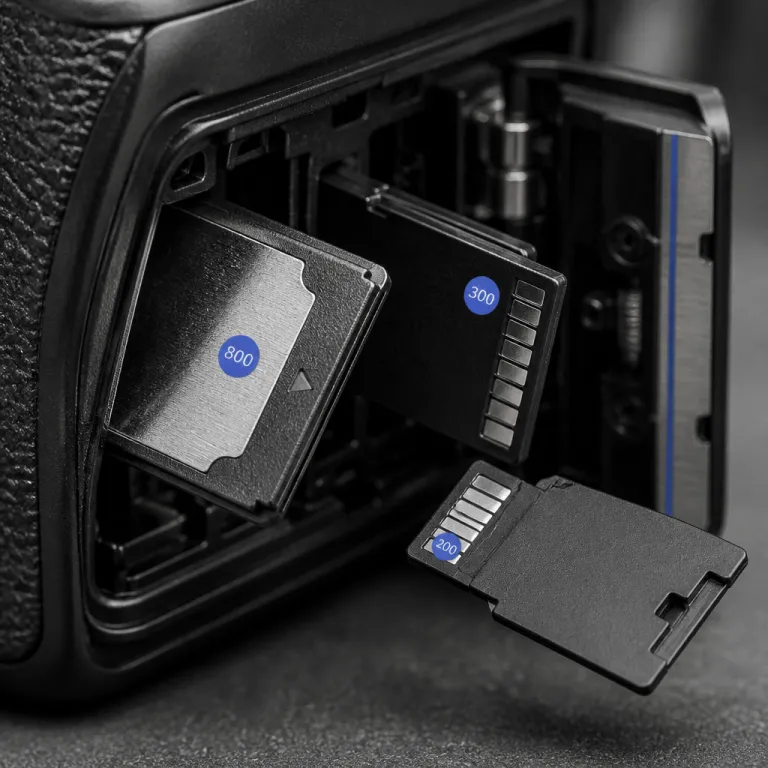
Matching the best memory card to your camera, not the marketing
The phrase best memory card camera 2026 cfexpress vs sd hides a simple truth. Your camera only benefits from fast memory cards when the card’s real write speed matches the camera’s internal bus and buffer, so buying the priciest card is often wasted money. The right card for a vlogger using a mid range camera will differ from what a sports photographer with high end frame cameras needs.
Start with the camera manual or menu and check which cards and buses it supports, because a CFexpress Type B card in a Canon EOS R5 behaves very differently from a UHS I SD card in an older Canon EOS 80D. Many hybrid shooters own several cameras, and the best memory card choice for 2026 when weighing CFexpress against SD should be made for the slowest body in the kit, not just the flagship, so that cards can rotate safely between cameras. If you shoot both full frame and APS C cameras, align your memory cards strategy so that every card can at least record your main video codec without dropped frames.
For most vloggers using Sony A7 IV or Canon EOS R6 Mark II bodies, UHS II SD cards with V60 speed ratings already match the camera’s sustained write needs for 4K 25p or 4K 50p IPB recording. CFexpress cards only start to matter when you push 4K 120p, All I codecs, or long bursts of RAW stills, which is where the SD versus CFexpress decision becomes relevant for the best memory card camera setups in 2026. Think of card speed as one part of a chain that also includes buffer size, firmware updates, and your card reader, because the slowest link always sets the pace.
On many photography forums, experienced contributors often have strong opinions about which card is best. Some users point to years of shooting weddings or sports as proof that their preferred brand or format is superior, but your own workflow matters more than any popularity score or profile badge. Treat every recommendation as one data point, then test a card in your own camera before committing your entire memory budget.
SD, microSD and CFexpress: buses, types and real world speeds
SD cards, microSD cards and CFexpress cards all store digital memory, yet they use very different buses and connectors. UHS I SD cards top out around 90 MB/s real write speed, while UHS II cards with their second row of pins can sustain 150 to 260 MB/s in practice, which already covers most 4K video needs in typical cameras. CFexpress Type A and Type B cards use PCIe based protocols that can push sustained speeds above 400 MB/s, but only if the camera and card reader are designed to exploit them.
For vloggers using Sony A7S III, FX3 or newer Sony full frame cameras, CFexpress Type A slots sit beside UHS II SD slots, and this is where the best memory card camera 2026 cfexpress vs sd question becomes concrete. If you only shoot 4K 25p or 4K 50p in Long GOP codecs, a good V60 SD card will usually match the camera’s needs, while CFexpress Type A cards mainly help with 4K 120p All I or long RAW bursts. On Canon EOS R5 or R3 bodies that use CFexpress Type B, the higher bus speed lets the buffer clear dramatically faster after a burst, which matters for wildlife and sports more than for talking head content.
MicroSD cards are tempting for action cameras and drones, but their tiny form factor often means lower sustained write speed and more heat, so they are rarely the best memory cards for demanding hybrid cameras. Use microSD only when the camera requires it, and prefer full size SD cards in any camera that accepts them, because the larger physical card is easier to handle and more robust in daily use. When you compare SD versus CFexpress, remember that the card’s V rating and bus type matter more than the headline read speed printed on the label.
If you want a deeper breakdown of how many photos fit on a given capacity, a guide such as this explanation of the capacity of a 32 GB card for photos can help you translate gigabytes into real shooting time. That kind of resource turns abstract memory numbers into practical planning tools for travel or client work. Once you understand capacity, you can focus on speed classes and how they relate to your specific codecs.
How fast is fast enough for 4K video and burst shooting
To decide between SD and CFexpress for the best memory card camera 2026 cfexpress vs sd scenario, you need to translate video bitrates into card write speeds. Take your camera’s video bitrate in megabits per second, divide by eight to convert to megabytes per second, then add at least twenty percent headroom for safety and overhead. A 200 Mbps 4K codec therefore needs a card that can sustain at least 30 MB/s, so a V30 SD card is enough, while a 600 Mbps All I codec needs around 90 MB/s, which pushes you toward V90 SD or CFexpress.
Real world testing shows that many V60 SD cards sustain around 80 to 120 MB/s, which comfortably handles 4K 50p IPB on Sony and Canon EOS hybrid cameras. CFexpress cards, especially in Type B format, often sustain 400 MB/s or more, which is overkill for most vloggers but transformative for photographers who hammer long RAW bursts on full frame sports bodies. The best memory card choice in 2026 when weighing CFexpress against SD therefore hinges on whether your bottleneck is video bitrate or stills buffer clearing.
Burst buffer math is simple but often ignored when people debate memory cards. If your camera shoots 20 RAW frames per second at 50 MB per file, that is 1 000 MB per second hitting the buffer, and a CFexpress card writing at 400 MB/s will clear that buffer far faster than a V90 SD card writing at 150 MB/s, which means less waiting between bursts. For landscape or studio work, you may never hit the buffer, so a cheaper SD card remains the smarter solution.
When you shop, ignore marketing claims like “up to 300 MB/s” and look for independent tests such as a detailed test of an Ultra 64 GB Class 10 SDXC UHS I memory card. Those tests reveal the sustained write speed that actually matters for video and bursts. They also highlight how cheaper cards sometimes throttle under heat, which is exactly when a long 4K take will fail.
To translate bitrates into practical choices, use the table below as a quick reference based on typical independent benchmark ranges for modern cards:
- 4K 25p / 30p IPB (100–150 Mbps) → needs ~20 MB/s sustained → V30 SD is sufficient on UHS I or UHS II.
- 4K 50p / 60p IPB (200–300 Mbps) → needs ~30–40 MB/s → V60 SD on UHS II is recommended.
- 4K 120p IPB or 4K 60p All I (400–600 Mbps) → needs ~60–90 MB/s → fast V90 SD or entry level CFexpress.
- High bitrate 4K 120p All I or RAW video (800 Mbps and above) → needs 100 MB/s+ → CFexpress Type A or Type B, depending on the camera.
- Long RAW stills bursts on 40–50 MP bodies → buffer limited → CFexpress Type B with 400 MB/s+ sustained writes gives the most headroom.
As a rough independent benchmark comparison, many modern V30 SD cards sustain around 30–45 MB/s, V60 cards often land near 80–120 MB/s, V90 cards typically reach 130–180 MB/s, while mainstream CFexpress Type B cards frequently deliver 400–800 MB/s continuous writes in third party tests. These ranges explain why SD is usually enough for standard 4K recording, while CFexpress shines for extreme frame rates and heavy burst photography.
Brand reliability, card readers and workflow for working creators
Speed is only half the story, because reliability and workflow determine whether your memory cards quietly support you or ruin a shoot. Working professionals often gravitate toward lines like SanDisk Extreme Pro, ProGrade Digital and Sony Tough, not because of the logo, but because these cards survive daily abuse, travel and constant formatting. Cheap no name cards may benchmark well once, yet they are more likely to corrupt when a camera overheats or a battery dies mid write.
For Sony shooters, the Sony Tough SD and CFexpress cards offer reinforced shells and sealed contacts, which matter when you swap cards quickly on location. Canon EOS users with dual slot cameras can mix one CFexpress card and one SD card, running backup mode for paid work so that every frame writes to both cards simultaneously, while using overflow mode for personal projects to maximize capacity. In both systems, the best memory card camera 2026 cfexpress vs sd choice should be paired with a fast USB 3.2 or Thunderbolt card reader, because a slow reader can erase all the gains of a fast card.
Think of your workflow as a chain that includes the camera, the card, the card reader and the computer. If any link is slow or unreliable, your overall speed and safety suffer, so investing in a robust reader from the same brand as your cards can be a smart move. A good reader also reduces wear on the camera’s own USB port, which is often more fragile and more expensive to repair than an external accessory.
On many forums, you will see long time contributors describe how specific cards survived drops, rain or years of formatting, which can be more useful than synthetic benchmarks alone. Those real world stories, combined with independent sustained write tests, help you judge whether a premium line like Sony Tough or ProGrade Digital is worth the extra cost for your own shooting conditions. Watch out for counterfeit cards sold through grey market channels, because fake media often reports inflated capacities and speeds, then fails catastrophically under load.
Capacity planning, dual slots and long shoot strategies
Once you know whether SD or CFexpress suits your camera, you need a capacity plan that matches your shooting style. Vloggers who record long talking head segments in 4K often benefit more from several medium capacity cards than from a single huge card, because spreading risk across multiple cards limits the damage if one fails. For stills heavy days with full frame cameras, a mix of 128 GB and 256 GB memory cards usually balances capacity, cost and backup flexibility.
Dual card slots change the equation, especially on modern Canon EOS and Sony bodies where you can choose between backup and overflow modes. For client work, weddings or once in a lifetime events, run backup mode so that every frame writes to both cards, even if that halves your effective capacity, because redundancy beats raw gigabytes when things go wrong. For personal projects or casual travel, overflow mode lets the camera fill one card then automatically switch to the next, which is convenient when you are filming yourself and cannot monitor card status constantly.
Formatting in camera after every safe backup keeps the file system clean and reduces the risk of corruption. Avoid deleting individual files on the card from your computer, because that can fragment the memory and confuse some camera firmware, especially on older bodies that never received later firmware updates. Treat each card as part of a rotation, labeling them clearly and retiring any card that shows even a single unexplained error.
When you plan your overall kit, remember that lenses and ecosystem choices often outlast bodies and cards, as explained in this guide on why your lens choices outlast multiple camera bodies. That perspective helps you decide whether to invest in more CFexpress cards now or stay with SD until your next body upgrade. In the end, the best memory card camera 2026 cfexpress vs sd setup is the one that quietly supports your storytelling without drawing attention to itself.
Community signals, real world points and avoiding spec sheet traps
Online communities can be helpful when you are choosing between SD and CFexpress, but you need to read their signals carefully. A camera forum might show points, likes and replies views under each member name, yet those metrics mainly reflect how long someone has been posting, not whether their advice fits your workflow. When you see a well member or active member with thousands of posts likes, treat that as a prompt to read closely, not as automatic proof that their best memory card camera 2026 cfexpress vs sd recommendation is right for you.
Some platforms even show combined upvote downvote tallies, which can tempt people to write dramatic takes about memory cards and cameras. You might see a thread where someone named Tim Mayo, described as a veteran member, argues that only CFexpress cards are professional, while another member pro insists that V60 SD cards are enough for every camera. The truth usually sits between those extremes, shaped by your specific codecs, your frame rate, your tolerance for buffer delays and your appetite for redundancy.
When you read such debates, click through to see the camera models, lenses and shooting scenarios people actually use. A Sony A1 owner shooting 30 frames per second RAW bursts for sports has very different needs from a Canon EOS R8 owner filming 4K 25p talking heads, even though both use full frame sensors and modern firmware updates. Always translate forum anecdotes into your own context before you click buy on another card.
Spec sheets and marketing blurbs rarely mention how cards behave when the camera overheats, the battery dies mid write or the card is bumped during recording. Those edge cases are where robust lines like Sony Tough or ProGrade Digital often justify their higher price, because they fail less often when conditions are bad. In the end, the smartest creators treat memory cards as consumable but critical tools, choosing the best memory card camera 2026 cfexpress vs sd combination that matches their cameras today while leaving room for the bodies they will upgrade to tomorrow.
FAQ
How do I calculate the minimum card speed for my video bitrate ?
Take your camera’s video bitrate in megabits per second, divide by eight to convert to megabytes per second, then add at least twenty percent headroom. For example, a 200 Mbps codec needs a card that can sustain at least 30 MB/s, so a V30 SD card is sufficient. A 600 Mbps codec needs around 90 MB/s, which usually means V90 SD or CFexpress.
When do I really need CFexpress instead of SD cards ?
CFexpress becomes necessary when your camera records very high bitrate codecs, such as 4K 120p All I or high frame rate RAW video, or when you shoot long bursts of high resolution RAW stills. In those cases, SD cards may cause buffer slowdowns or dropped frames. For typical 4K 25p or 4K 50p Long GOP recording, good V60 SD cards are usually enough.
Is microSD a bad idea for hybrid cameras ?
MicroSD cards are fine when a device requires them, such as action cameras, drones or some compact devices. For interchangeable lens cameras with SD slots, full size SD cards are preferable because they are more robust, easier to handle and often have better sustained write speeds. Use microSD only when the camera does not accept full size SD cards.
How many memory cards should I carry for a full day shoot ?
For a full day of 4K vlogging, many creators carry at least three cards of 128 GB each, rotating them through the camera and backing up during breaks. Stills photographers often carry several 64 GB or 128 GB cards, spreading risk across multiple cards instead of relying on a single large one. The exact number depends on your codec, frame rate and whether you use dual slot backup.
Should I format my cards on the computer or in the camera ?
Formatting in camera is safer because the camera creates the file system it expects, reducing the risk of corruption. After backing up and verifying your footage, format the card in the camera that will use it next, rather than deleting files on a computer. This habit keeps the card’s memory structure clean and more reliable over time.