Comparing card types, UHS standards, and CFexpress formats
Different card type formats shape how your camera handles speed and capacity. Traditional SD memory cards remain dominant in consumer cameras, while CFexpress cards increasingly power high performance bodies that demand extreme write speeds. MicroSD cards are popular in action cameras and drones, but many serious photographers still prefer full size cards for durability and handling.
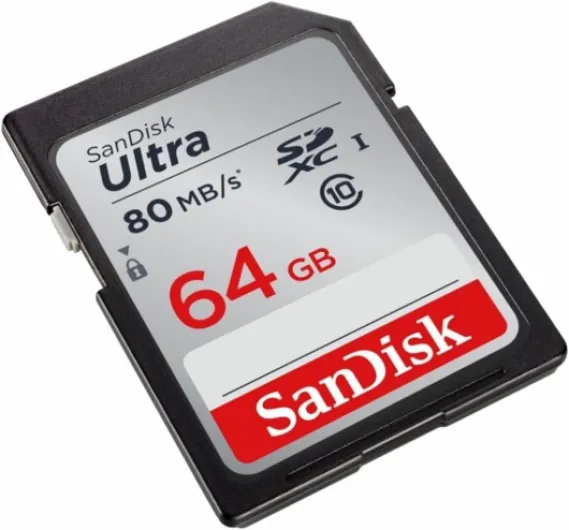
Within SD cards, UHS standards define potential performance, with UHS cards labeled UHS I or UHS II depending on their bus interface. A pro UHS II memory card offers extra pins for faster read write transfers, which helps when offloading large video files to a computer. However, your camera must support the same UHS cards standard to benefit from the higher speed write capabilities, otherwise the card will fall back to slower modes.
CFexpress type cards, including CFexpress type A and CFexpress type B, use PCIe technology to deliver very high speeds. These cards tested in demanding cameras can sustain extreme write speeds that keep up with long RAW bursts and high bitrate video. If your camera supports CFexpress type formats, investing in at least one high capacity card can transform how responsive the buffer feels during intense shooting.
Brands like Sandisk and Lexar compete strongly in both SD and CFexpress segments, with lines such as Sandisk Extreme and Lexar Professional targeting advanced users. A Sandisk Extreme Pro card, for example, combines high read speeds with robust write speed ratings, making it suitable for hybrid photo and video work. When researching a new mirrorless vlog camera with 4K video, such as those reviewed in this detailed vlogging camera test, always cross check which memory cards and type cards are officially recommended.
Decoding speed, write performance, and real world reliability
Manufacturers promote impressive read speeds on packaging, but photographers should prioritize sustained write speeds. The write speed determines how quickly a memory card clears the camera buffer, which directly affects burst length and responsiveness. For video shooters, stable write speeds are essential to avoid dropped frames or recording errors during long takes.
Marketing terms like speed write or maximum speeds can be misleading, because they often reflect short bursts rather than continuous performance. When evaluating the best digital camera memory cards, look for detailed write speed specifications and independent tests that show how cards tested under stress behave. A card that maintains consistent write speeds over time is more valuable than one that peaks briefly at unrealistic levels.
Read speed still matters, especially when transferring large files from memory cards to a computer after a long assignment. High read speeds on Sandisk Extreme or Lexar Professional cards can significantly shorten backup times, particularly when using fast card readers that match the card type. For professionals handling thousands of RAW files and 4K video clips, these faster read speeds translate into real productivity gains.
Reliability goes beyond speed, and this is where warranty terms and build quality become important. Many pro UHS and CFexpress cards offer a limited warranty or even a lifetime limited warranty, signaling confidence in long term durability. When a brand such as Sandisk or Lexar backs its memory card with strong warranty coverage, it reassures photographers that their best memory investment is protected against manufacturing defects.
Hybrid creators who record audio with an external microphone, such as those tested in this professional vlogging microphone review, should pay particular attention to write speeds. Clean audio and smooth video both depend on memory cards that maintain stable speed write performance throughout a shoot. In practice, that means choosing cards tested for continuous recording rather than only short bursts.
Brand comparisons, warranties, and buying safely on Amazon
Among the best digital camera memory cards, Sandisk and Lexar dominate discussions for good reasons. Sandisk Extreme and Extreme Pro lines are widely used in both consumer and professional cameras, offering a balance of high read write performance and robust construction. Lexar Professional cards compete directly, often emphasizing strong read speeds and attractive pricing for high capacity options.
When comparing Sandisk Extreme to Lexar Professional, consider not only headline speed but also warranty terms and regional support. Many premium memory cards include a limited warranty, and some pro UHS or CFexpress cards advertise a lifetime limited warranty that covers defects for the product’s usable life. Reading the fine print helps you understand whether data recovery services are included or whether the warranty only replaces the card itself.
Buying on Amazon can be convenient, but it introduces the risk of counterfeit cards that mimic genuine Sandisk or Lexar branding. To protect your camera and files, purchase memory cards only from official brand stores or authorized resellers on Amazon, and verify packaging carefully on arrival. Once received, you can run basic cards tested utilities on a computer to confirm capacity, read speed, and write speed match the advertised specifications.
Some photographers prefer to standardize on a single card type and brand across all their cameras. Using the same memory card family, such as Sandisk Extreme Pro SD cards or Lexar Professional CFexpress type cards, simplifies labeling, backups, and troubleshooting. This consistency also makes it easier to track which cards tested reliably over time and which should be retired before they threaten important files.
Price remains a factor, but the cheapest memory cards rarely offer the best memory balance of speed, reliability, and warranty support. Spending slightly more on reputable brands with strong limited warranty coverage often saves money compared with recovering lost video or irreplaceable RAW files. For many photographers, the peace of mind that comes with trusted cards is worth far more than a small upfront saving.
Matching card performance to photography, video, and workflow needs
Choosing the best digital camera memory cards starts with an honest assessment of how you shoot. A casual photographer using a compact camera for JPEG images can rely on modest UHS cards, while a sports photographer shooting continuous RAW bursts needs much higher write speeds. Video creators recording 4K or high frame rate footage sit somewhere in between, demanding stable speed write performance and generous capacity.
For stills focused work, prioritize memory cards with strong sustained write speed and reliable buffer clearing. A Sandisk Extreme Pro or Lexar Professional UHS II card can keep up with fast action, ensuring that your camera rarely locks up during critical moments. In this context, read speed is secondary, although faster read speeds still help when offloading large batches of files after a long day.
Video centric shooters should examine not only write speeds but also video specific ratings such as V30, V60, or V90 on UHS cards. These ratings indicate guaranteed minimum write speeds, which are crucial for uninterrupted recording of high bitrate video. When using CFexpress type cards, check that your camera’s firmware fully supports the card type and that cards tested by the manufacturer meet the required performance envelope.
Workflow considerations extend beyond the camera, because memory cards interact with card readers, editing software, and backup systems. High read write performance on CFexpress or pro UHS cards can dramatically shorten ingest times, especially when combined with fast USB or Thunderbolt readers. Photographers who regularly handle large video projects or time sensitive assignments often view these time savings as essential rather than optional.
For creators who also manage posing, lighting, and composition, tools such as photography posing blocks for digital camera sessions can refine the shooting experience. However, even the best posing aids cannot compensate for a slow memory card that interrupts the flow of a session. Aligning your camera, memory card, and creative workflow ensures that technical limitations never overshadow artistic decisions.
Testing, formatting, and caring for your memory cards
Once you have selected the best digital camera memory cards for your system, proper care becomes essential. New memory cards should be formatted in the camera rather than on a computer, because this ensures the file system matches the camera’s expectations. Regular in camera formatting, after safely backing up files, helps maintain performance and reduces the risk of corruption.
Before trusting a new memory card on a critical assignment, run basic cards tested procedures. You can copy large files repeatedly to check read write consistency, monitor actual read speeds and write speeds, and confirm that capacity matches the label. Some photographers also perform long video recording tests to verify that speed write performance remains stable over extended periods.
Handling practices influence longevity, even when a card carries a lifetime limited warranty or strong limited warranty terms. Avoid removing memory cards while the camera is still writing, and store cards in protective cases to prevent physical damage or static discharge. For microSD cards used with adapters, take extra care when inserting or removing them, because the smaller card type is easier to misalign or drop.
Labeling memory cards clearly with capacity, card type, and purchase date helps track usage and anticipate failures. Many professionals retire heavily used Sandisk Extreme or Lexar Professional cards after a certain number of cycles, even if they still function, to protect irreplaceable files. This proactive approach treats memory cards as consumables rather than permanent storage, aligning expectations with real world wear.
Finally, always maintain at least two separate backups of important files, because no memory card, however pro or high speed, is infallible. Even the best memory solutions, including CFexpress type and pro UHS cards, can fail unexpectedly despite generous warranty coverage. A robust backup strategy ensures that your camera, cards, and creative work remain protected against both technical faults and human error.
Practical buying checklist for the best digital camera memory cards
When evaluating the best digital camera memory cards, start with compatibility. Confirm which card type your cameras accept, whether they support UHS cards or CFexpress type formats, and whether microSD cards via adapters are recommended or discouraged. Matching the memory card format to the camera’s slot avoids bottlenecks and ensures that advertised speeds are realistically achievable.
Next, balance capacity with performance, because larger memory cards are not always the best memory choice. For critical work, many professionals prefer several medium capacity Sandisk Extreme Pro or Lexar Professional cards instead of a single very high capacity card. This approach reduces the risk of losing all your files if one card fails, while still benefiting from strong read write performance and robust warranty coverage.
Assess speed ratings carefully, focusing on sustained write speed, realistic read speed, and independent cards tested data. Look for clear information about write speeds, video class ratings, and whether the card is positioned as a pro UHS or entry level product. For CFexpress cards, check that the manufacturer specifies both maximum and minimum speeds, because consistent speed write performance matters more than brief peaks.
Brand reputation and warranty terms should heavily influence your final decision. Established names like Sandisk and Lexar typically offer a limited warranty or lifetime limited warranty on their higher end memory cards, signaling confidence in durability. Buying through trusted channels such as official Amazon brand stores helps ensure that the Sandisk Extreme or Lexar Professional card you receive is genuine and fully supported.
Finally, consider your future needs, including potential camera upgrades and more demanding video formats. Investing in slightly faster cards today, whether high speed UHS cards or CFexpress type cards, can extend their usefulness across multiple camera generations. With a thoughtful checklist and attention to detail, you can build a reliable set of memory cards that supports your photography and video ambitions for many years.
Common questions about the best digital camera memory cards
How much capacity do I really need for my camera?
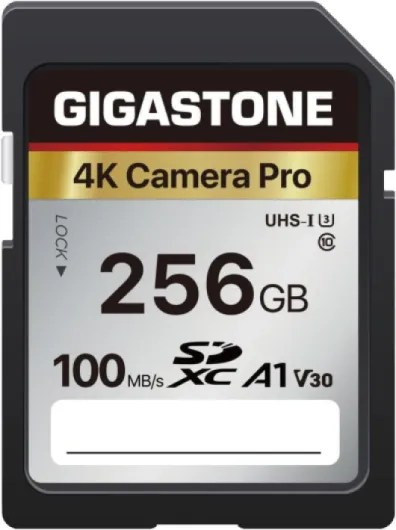
Capacity needs depend on your shooting style, file format, and video resolution. Photographers who shoot mainly JPEG can work comfortably with 64 GB memory cards, while RAW and 4K video users often prefer 128 GB or 256 GB cards. Many professionals carry several medium capacity cards rather than a single very large card to reduce risk.
Are CFexpress cards worth it compared with fast UHS cards?
CFexpress cards deliver significantly higher read write performance than even pro UHS II cards, which benefits long RAW bursts and high bitrate video. However, they are only worth the investment if your camera supports the CFexpress type format and your work regularly pushes buffer limits. For moderate shooting needs, high quality UHS cards such as Sandisk Extreme Pro or Lexar Professional often provide sufficient speed.
Can I mix different brands and types of memory cards?
You can safely use different brands and card type formats as long as each card is compatible with your camera. Many photographers mix Sandisk and Lexar cards, or combine SD memory cards with CFexpress cards in dual slot cameras. The key is to format each card in camera and avoid switching cards between different camera systems without reformatting.
How often should I replace my memory cards?
There is no fixed schedule, but heavy users often replace primary cards every few years. Signs that a memory card should be retired include frequent write errors, unusually slow read speeds, or difficulty formatting. Even with a lifetime limited warranty, proactive replacement before failure is wise for critical professional work.
Is it safe to buy memory cards from Amazon?
Buying from Amazon is generally safe if you choose official brand stores or clearly authorized resellers. Avoid unusually cheap listings for premium Sandisk Extreme or Lexar Professional cards, because these can indicate counterfeits. After purchase, verify capacity and basic read write performance to confirm that the card matches its specifications.