Understanding what a cam cage is
What is a Camera Cage and Why Does It Matter?
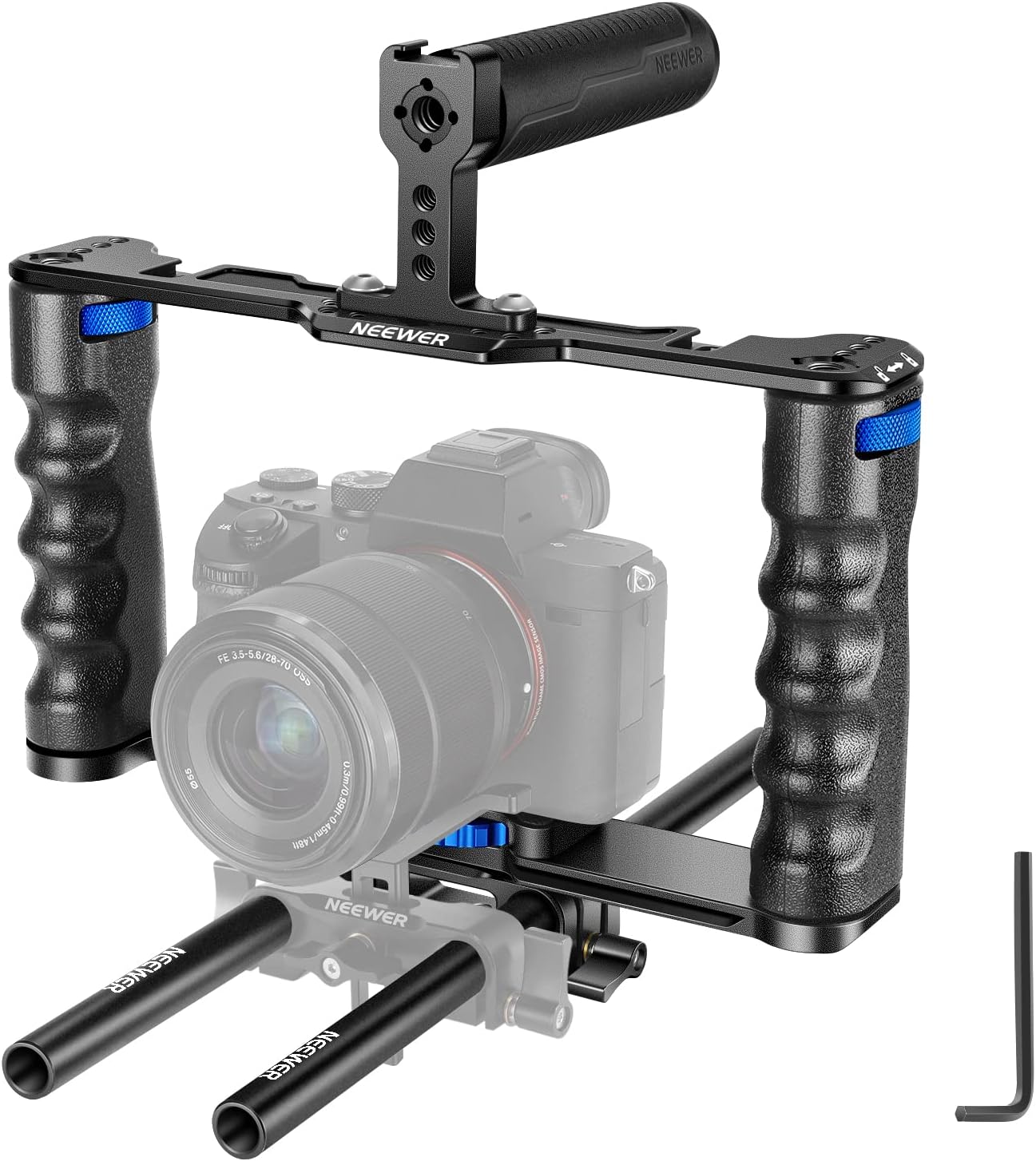
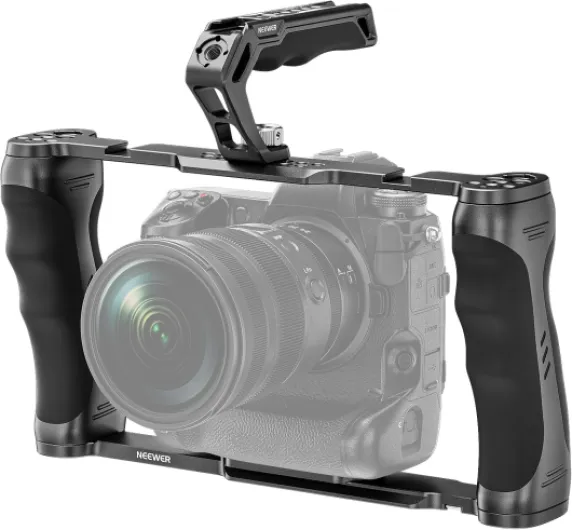
A camera cage is a protective frame, usually made from aluminum alloy, that wraps around your digital camera. Its main job is to provide extra mounting points for accessories like a top handle, cold shoe, quick release plate, or even a battery plate. Whether you use a Canon EOS, Sony, or Panasonic cinema camera, there are cage options designed to fit your specific model, including full camera cages, half cages, and single rod setups. Some cages are universal, while others are tailored for a particular camera type, such as a cage for Canon EOS Mark or a cage for Panasonic models.
How a Cage Enhances Your Camera Setup
With a camera cage, you can easily attach microphones, lights, monitors, or even a mount battery for longer shoots. This flexibility is especially important for video creators and those using their camera for professional work. The cage also adds a layer of protection, reducing the risk of damage if your camera gets bumped or dropped. Many cages feature a top handle or handle arca for better grip and easier low-angle shots. Some cages, like those from Tilta or SmallRig, are highly rated in reviews for their build quality and compatibility with popular cameras like the Canon EOS or Sony Alpha series.
Types and Price Ranges
Camera cages come in a range of prices, from budget-friendly options on Amazon to high-end models with advanced features. You’ll find cages on sale, with sale prices in EUR or USD, and some products even offer bundles that include a single rod or battery plate. When comparing products, look for reviews that mention durability, compatibility, and ease of use. Some cages are designed specifically for a cage Canon or cage Sony, while others are more universal. The color options, like gray or black, and the material—usually aluminum alloy—can also influence your choice.
Compatibility and Mounting
Before buying, always check if the cage is compatible with your camera model. For example, a cage for Canon EOS may not fit a Panasonic or Sony camera. Many cages offer a quick release system or a release plate for fast setup and breakdown. Some even support mounting a full camera rig or adding a cold shoe for extra accessories. If you’re planning to use your camera in unique situations, like mounting it on a car for stable footage, it’s important to choose a cage that supports secure mounting. For more on this, see this guide on how to securely attach a camera mount on your car for stable footage.

Key benefits of using a cam cage
Unlocking Versatility and Stability
Adding a cage to your digital camera setup can be a game changer, especially if you’re aiming for professional-quality video. A camera cage creates a solid frame around your device, allowing you to attach essential accessories like a top handle, cold shoe mounts, or even a battery plate. This means you can easily mount microphones, lights, or external monitors, turning your basic camera into a full cinema camera rig. For those shooting with a Canon EOS, Sony, or Panasonic, there are compatible options for nearly every model, including half cage and full camera designs.
Enhanced Protection and Customization
One of the main reasons users invest in a camera cage is protection. The aluminum alloy construction shields your camera body from bumps and knocks, which is especially valuable during fast-paced shoots or when using a release plate for quick transitions. Some cages, like those from Tilta or SmallRig, offer single rod support for mounting follow focus systems or matte boxes, further expanding your creative options. Reviews often highlight how a cage can help transform your filmmaking experience by making your setup more robust and adaptable.
Improved Ergonomics and Handling
With the addition of a top handle or side grip, handling your camera becomes much easier, especially for handheld video work. This is particularly useful for heavier setups, such as when using a Canon EOS Mark series or a cinema camera with a large lens. The ability to select and mount handles or quick release plates means you can tailor the rig to your shooting style. Some cages even include an arca-compatible handle for seamless tripod transitions.
- Better accessory mounting with multiple cold shoe and threaded points
- Enhanced stability for smoother handheld shots
- Protection for your camera body during demanding shoots
- Customizable options for different camera types and brands
- Potential to save money by adapting your existing camera for more advanced video work instead of upgrading to a new product
Whether you’re looking at a cage for your Canon EOS, Sony, or Panasonic, or comparing sale prices on Amazon or other retailers, the right camera cage can offer significant value. Consider the type of shooting you do, the accessories you need, and the reviews of top products before making your choice. With the right setup, you can unlock new creative possibilities and get more from your camera investment.
Choosing the right cam cage for your camera
Finding the Best Fit for Your Camera Model
When selecting a cage for your digital camera, compatibility is the first thing to check. Not all cages fit every camera body. For example, a cage designed for a Canon EOS camera may not work with a Sony or Panasonic model. Always verify if the product description lists your camera, such as Canon EOS Mark, cage Sony, or cage Panasonic. This ensures a secure fit and access to essential controls.
Material and Build Quality Matter
Most high-quality camera cages are made from aluminum alloy, offering a balance between durability and weight. A full camera cage provides more protection, while a half cage is lighter and may be suitable for smaller setups. Consider if you need a robust cinema camera rig or a lighter option for travel and quick shoots.
Features to Match Your Shooting Style
- Top handle: Essential for low-angle video shots and stable handheld work. Some cages come with a handle arca or top handle for easy carrying.
- Mount battery and battery plate: Look for cages that allow you to attach a battery plate or mount battery accessories for longer shoots.
- Cold shoe and single rod options: These let you add microphones, lights, or monitors. A cold shoe mount is a must for video creators.
- Quick release plate: A quick release system saves time when switching between tripod and handheld modes.
Budget and Value Considerations
Price varies widely. Entry-level cages can be found on Amazon or during a sale, with sale price options in EUR or USD. Brands like Tilta and SmallRig offer a range of cages, from basic to advanced. Read reviews to compare features and durability. Sometimes, paying a bit more for a top product means better long-term value and fewer headaches.
Color and Aesthetic Choices
While gray is a common color for aluminum cages, some brands offer different finishes. Choose a style that matches your gear and personal taste.
Don’t Forget Lens Compatibility
If you’re building a video rig, think about your lens setup. Some cages are designed to support larger lenses or specific accessories. For example, if you use a must-have lens for photography enthusiasts, check out this guide to the Fujifilm 23mm 1.4 lens for more insights.
Summary Table: Key Factors When Choosing a Camera Cage
| Factor | What to Check |
|---|---|
| Compatibility | Camera model (Canon EOS, Sony, Panasonic, etc.) |
| Material | Aluminum alloy, weight, durability |
| Features | Top handle, cold shoe, battery plate, quick release |
| Price | Sale price, reviews, value for money |
| Type | Full camera cage, half cage, single rod options |
Essential features to look for in a cam cage
Build Quality and Materials Matter
When selecting a camera cage, the material is a key factor. Most top options are made from aluminum alloy, which offers a strong balance between weight and durability. A full camera cage made from this material can protect your camera body, whether you use a Canon EOS, Sony, or Panasonic model. Some cages, like those from Tilta, are known for their robust construction and reliable reviews.Compatibility with Your Camera and Accessories
Not every cage fits every camera. Always check if the cage is compatible with your specific model, such as a cage Canon for EOS Mark series or a cage Sony for cinema camera setups. Look for cages that support quick release plates and have a universal design if you plan to switch between different cameras. Compatibility with battery plates and single rod systems is also important for video shooters.Mounting Points and Expansion Options
A good camera cage should offer plenty of mounting points. Cold shoe mounts, multiple 1/4" and 3/8" threads, and ARRI locating holes allow you to attach microphones, monitors, and lights. Some cages include a top handle or handle arca, making handheld shooting easier. Half cage designs are lighter, while full cages provide more protection and mounting options.- Top handle: Essential for low-angle shots and stable handheld work
- Cold shoe: Attach audio or video accessories quickly
- Release plate: Fast camera swaps on set
- Battery plate: Power your camera and accessories for longer shoots
Price, Reviews, and Where to Buy
Price can vary widely, from budget cages on Amazon to premium models from brands like Tilta. Always compare the sale price and check if the product is in stock. Look for reviews that mention durability, ease of use, and compatibility with your camera type. Some sellers offer discounts, so you can save on your purchase—especially during a sale. If you’re in Europe, check if the price is listed in EUR and if shipping is available to your location.Design Features for Practical Use
Consider the cage’s ergonomics. A gray finish can reduce reflections, and a well-placed handle makes a big difference for comfort. Some cages are designed for quick release, letting you move fast between tripod and handheld setups. If you use a cinema camera or need to mount heavy accessories, look for reinforced mounting points and a sturdy build.Practical tips for setting up your cam cage
Step-by-step approach for mounting your cage
- Start by checking the compatibility of your camera with the selected cage. For example, a cage canon is designed for Canon EOS models, while a cage sony fits Sony cameras. Always verify product specifications and reviews before purchase.
- Place your camera into the cage, ensuring all ports and buttons remain accessible. Some cages, like the Tilta or SmallRig models, offer a quick release plate for easy mounting and removal.
- Secure the camera using the provided screws. Most cages use a standard 1/4-inch screw at the base. Tighten gently to avoid damaging the camera body or the aluminum alloy frame.
- Attach accessories such as a top handle, cold shoe mounts, or a single rod for microphones and lights. Consider your shooting style and the type of video you plan to create. For cinema camera setups, a battery plate or mount battery can extend shooting time.
- If your cage supports it, add a handle arca or side handle for better grip and stability. This is especially useful for handheld shooting with a full camera rig.
- Test all functions, including battery access, screen movement, and cable connections. A well-designed cage should not block essential features of your Canon EOS, Panasonic, or Sony camera.
Optimizing your setup for different shooting needs
- For lightweight setups, a half cage may be sufficient. It offers protection and mounting options without adding much weight.
- For more advanced rigs, consider a full camera cage with multiple mounting points, a top handle, and space for a battery plate. This is ideal for longer shoots or when using heavier lenses.
- Use the cold shoe and quick release features to swap accessories quickly, especially if you need to change from tripod to handheld shooting.
- Check the balance of your rig after adding accessories. A well-balanced cage setup reduces fatigue and improves shot stability.
Budgeting and finding the best options
- Compare sale price and reviews on platforms like Amazon to find top options that fit your needs and budget. Look for deals in EUR or your local currency to save on your purchase.
- Don’t overlook the value of a gray market product if you’re comfortable with the warranty terms. Sometimes, these offer significant savings.
- Select a cage that matches your camera type, such as cage panasonic for Panasonic models or a cage canon for Canon EOS cameras, to ensure a secure fit and full compatibility.
Common mistakes to avoid with cam cages
Over-tightening and Stripping Threads
One of the most common mistakes when setting up a camera cage is over-tightening screws and mounts. Whether you are attaching a top handle, cold shoe, or release plate, applying too much force can strip threads, especially on aluminum alloy cages. This can compromise the cage’s stability and even damage your camera body. Always use the right tools and tighten just enough to secure the product.Ignoring Compatibility and Fit
It’s tempting to select a cage based on price or sale offers, but not all cages are compatible with every camera model. For example, a cage designed for a Canon EOS Mark series might not fit a Sony cinema camera or a Panasonic body. Double-check the manufacturer’s compatibility list and reviews before purchase. Look for cages specifically labeled as cage Canon, cage Sony, or cage Panasonic to ensure a proper fit.Blocking Essential Ports and Controls
A poorly chosen or incorrectly installed cage can block access to battery compartments, SD card slots, or HDMI ports. This is especially true for full camera cages and half cage designs. Before finalizing your setup, test all buttons, dials, and doors. If you use accessories like a mount battery or single rod system, make sure the cage allows for easy access and quick release.Overloading with Accessories
It’s easy to get carried away with mounting monitors, microphones, and lights onto every available cold shoe or top handle. However, adding too many accessories can make your setup heavy and unbalanced. Consider the weight limits of your cage and the type of shooting you do. For run-and-gun video, a lighter setup with only essential options is often best.Neglecting Balance and Ergonomics
A cage with a handle arca or top handle can improve grip, but improper placement can make the camera awkward to hold. Adjust the handle and any attached battery plate or quick release plate to maintain balance. This is especially important for longer shoots or handheld video work.Forgetting to Check for Secure Mounting
After assembling your cage, always double-check that all screws, plates, and accessories are securely fastened. Loose parts can cause rattling, affect video quality, or even result in dropped equipment. Regularly inspect your setup, especially after transport or when using new accessories from Amazon or during a sale.- Always select a cage that matches your camera type and model (Canon EOS, Panasonic, Sony, etc.)
- Read reviews and compare options before purchase
- Don’t sacrifice build quality for a lower sale price or eur savings
- Choose reputable brands like Tilta or Gray for reliability
By avoiding these common mistakes, you can save time, protect your gear, and get the most out of your camera cage setup.