
Summary
Editor's rating
Value for money: strong for teams and sports parents, less so for casual users
Design: compact, decent looking, but very function-first
Battery and connectivity: solid enough, but live streaming is picky
Durability and real-world use: feels solid, but not a tank
Performance: tracking is good when set up right, but not magic
What this thing actually does (beyond the marketing buzzwords)
Pros
- 4K 60 fps recording with wide-angle lens and decent stabilization for clear game footage
- AI tracking that follows the action reasonably well for soccer and basketball once properly set up
- No mandatory subscription and 20 GB of free cloud storage, good for regular use without ongoing fees
Cons
- Poor documentation and non-intuitive app; real learning curve before you get good results
- Live streaming reliability depends heavily on your network and setup, can be choppy or laggy
- Not ideal for very fast, close sports like hockey near the boards; gimbal angle and tracking can miss action

Specifications
View full product page →| Brand | XbotGo |
A camera that’s supposed to replace the parent with the tripod
I picked up the XbotGo Chameleon because I was tired of standing on the sideline filming every soccer and basketball game instead of actually watching. On paper, this thing sounded like the ideal lazy-parent/coach tool: clamp it up high, hit record, and let the AI follow the action. No subscription, 4K 60 fps, live streaming, FollowMe, scoreboard overlays… the whole package. I used it mostly for youth soccer and some indoor basketball over a few weekends.
First impression: it’s not some magic box you turn on and forget. You need to spend time with the app, the modes, and how it tracks. If you go straight from unboxing to a real game without testing, you’ll probably swear at it. Once I sat down and actually played with the settings at home and during a couple of low-stakes scrimmages, it started to make sense and the results were much better.
The big promise is simple: it follows the game for you. And when it works, it really does save you from babysitting a tripod or panning with your phone for an hour. The 4K footage looks clean, stabilization is decent, and for a lot of parents and coaches, that’s basically the main requirement: “can I watch the game later and see what happened?” For that, it gets the job done.
But it’s not perfect. Some things feel half-baked: the documentation is weak, live streaming is picky about your setup, and for some sports like hockey or anything very close to the camera, it struggles more. If you’re comfortable tinkering with apps and tech, it’s a pretty solid tool. If you hate reading manuals and menus, this might annoy you more than it helps at first.
Value for money: strong for teams and sports parents, less so for casual users
On the value side, the Chameleon sits in that awkward but fair middle ground. It’s not cheap, but compared to dedicated sports filming systems and subscription-based platforms, the one-time cost and no mandatory subscription are a big plus. You get 20 GB of free cloud storage, which is enough for several games at 4K if you manage your footage, and you can always download and wipe to avoid paying for extra space. For a season of youth sports, that’s pretty reasonable.
If you’re a coach, team manager, or a parent who records almost every game, the price starts to feel justified. You’re essentially replacing paying someone to film or spending every weekend stuck behind a phone. When it’s dialed in, you mount it, check framing, hit start, and then you can actually watch and coach. That saved attention is worth something. Plus, the ability to easily share games with the team and families, and create basic highlights, is genuinely useful.
On the other hand, if you only record the occasional game, or you’re fine with a static wide-angle shot from a basic camera or phone on a tripod, this might be overkill. There are cheaper ways to just “have a video” of the match. The Chameleon makes more sense if you specifically want automated tracking, live streaming, and some analysis potential, not just a static view.
I’d say the biggest downside for value is the time cost upfront. You need to invest a few sessions into learning the app and figuring out what works for your sport and venue. The manual won’t really help you, so you’ll learn mostly by trial and error and short test recordings. If you’re willing to do that, the long-term value is pretty solid. If you expect to unbox, press one button, and instantly get perfect broadcast-style footage, you’re going to be disappointed and feel like you overpaid.
Design: compact, decent looking, but very function-first
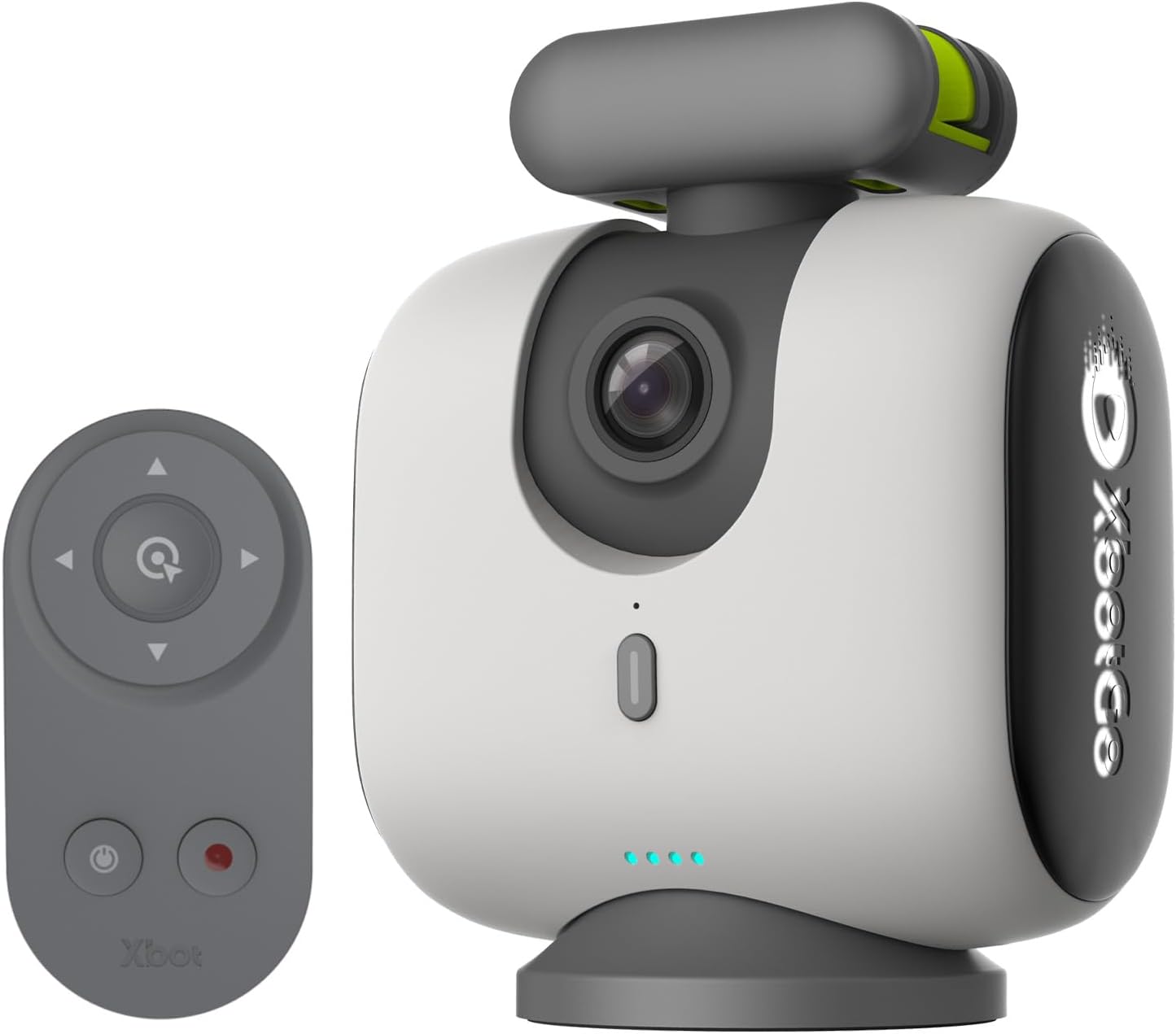
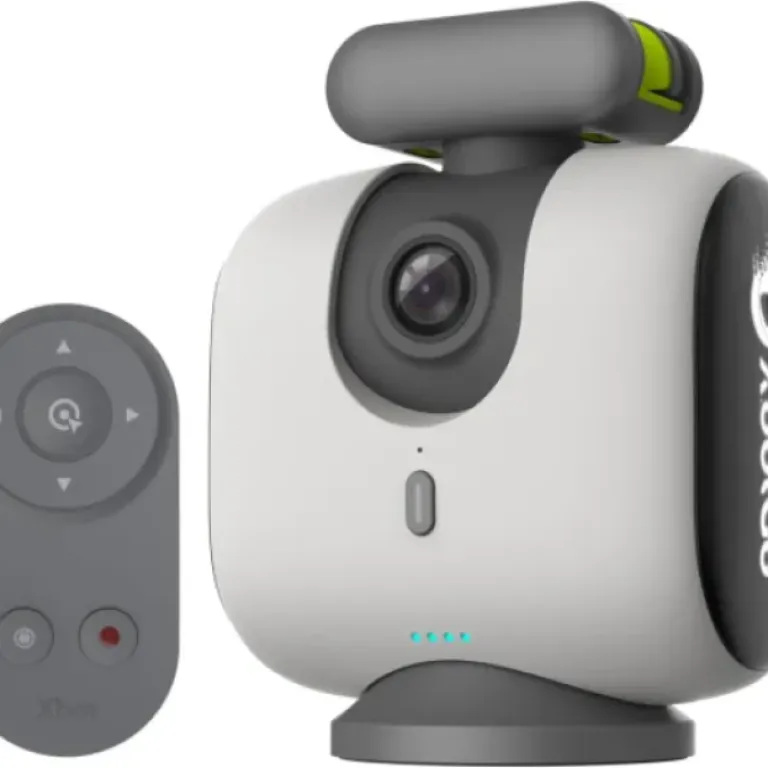
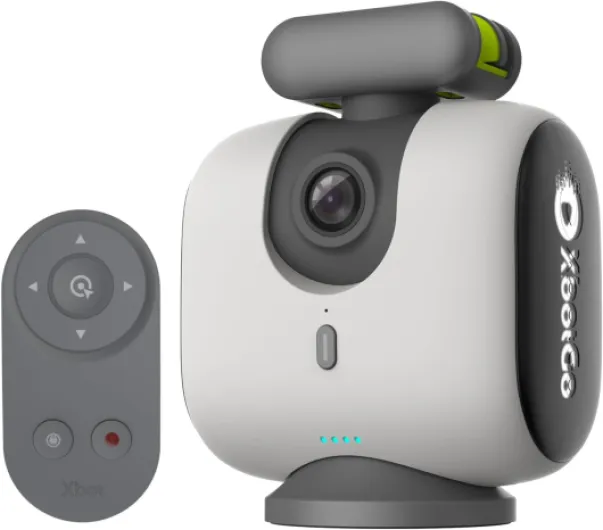
Design-wise, the Chameleon is pretty straightforward. It’s a compact unit in Pearl Grey, not flashy, not ugly, just neutral. It feels more like a piece of gear than a gadget, which I actually prefer. It’s roughly the size and weight you’d expect for a small pan/tilt head with a camera built in; it’s not heavy, but once you add a decent tripod, you’re not throwing the whole setup into a tiny purse. In a regular backpack with a mid-size tripod, it’s totally manageable.
The layout is fairly logical: you’ve got the mounting point for the tripod, the camera module up front, and some basic physical controls. Most of the time, though, you don’t touch the device itself once it’s up in the air. You control everything from your phone or remote. There’s also a Bluetooth remote in the box that lets you start/stop and do some gimbal controls, which is handy if you don’t want to keep the phone in your hand the whole time.
In terms of practical design details, a few things stood out:
- The gimbal has enough range for typical soccer and basketball setups, but if you mount it very close to the field and too low, you can run into angle limits, especially for sports like hockey where action hugs the near boards.
- The device itself looks solid enough for regular use, but it’s not some ruggedized, throw-it-in-the-mud action cam. You still need to treat it like electronics, especially in bad weather.
- Buttons and ports are not labeled in a super clear, beginner-friendly way. You’ll figure it out, but again, it feels like the manual could have saved some trial and error.
From a pure design perspective, I’d call it functional and pretty solid. It’s not something you buy because it looks cool; you buy it because it does a specific job. And on that front, the design supports the job well enough: it mounts easily, balances fine on a stable tripod, and once it’s up there, you mostly forget about the physical unit and just deal with the app.
Battery and connectivity: solid enough, but live streaming is picky
Battery life on the Chameleon itself is good enough for a typical youth game or two, but I wouldn’t go into a full-day tournament without a power bank. With 4K recording and AI tracking active, expect to be cautious after a couple of hours. In my use, one full soccer match plus warm-up and a bit of extra recording was fine, but I wouldn’t risk two full back-to-back games at max quality without topping up. The included lithium-ion battery does its job, just don’t assume it’s endless.
The bigger headache is less the battery and more the connectivity juggling if you want to live stream. To monitor the camera and control it, you’re usually connecting your phone to the Chameleon via Bluetooth and sometimes a hotspot setup. If you then also want to use Wi-Fi for live streaming, things can get messy, especially if you’re trying to follow their “ideal” setup with the camera mounted high and your phone acting as both controller and network bridge.
When I streamed to YouTube on a decent connection, the quality was acceptable, but it’s sensitive to network speed and stability. If your upload speed is mediocre or the signal is flaky, the stream turns into a slideshow pretty quickly, like that 1-star hockey review described. So yes, it can stream, but it’s not plug-and-play reliable in every environment. I’d say live streaming is usable, but not the main reason to buy this unless you’re willing to test your setup at the field beforehand.
One tip: if you want a more stable streaming setup, using a second device as a monitor/scoreboard controller and keeping the main phone closer to the router or hotspot helps. It’s a bit of a nerdy configuration, but it does make the system more reliable. Overall, battery is decent, connectivity is powerful but slightly fussy. If you only care about recording locally and uploading later, life is much easier and the camera feels way more stable and predictable.
Durability and real-world use: feels solid, but not a tank
In terms of durability, the Chameleon feels pretty solid but not bombproof. The plastic and build don’t feel cheap, and after hauling it in and out of a backpack, setting it up on different tripods, and dealing with some light wind and dust at outdoor fields, it still looks and behaves like new. Nothing rattles, the gimbal motion stayed smooth, and I didn’t notice any weird noises or play in the joints.
That said, this isn’t a GoPro you can strap to a helmet and crash into the ground with. It’s meant to live on a tripod, away from flying balls and people. If you’re setting up on the sideline of a kids’ game, you do need to think about where you place the tripod so it doesn’t get knocked over. The camera itself will probably survive normal bumps, but a full drop from 10–12 feet onto concrete or a gym floor is not something I’d expect it to shrug off.
Weather-wise, I used it in mild wind and some chilly conditions, and it was fine. I wouldn’t trust it in heavy rain without some kind of cover. There’s nothing in the specs that screams “weather-sealed”, so I treated it like any other regular camera: light drizzle maybe, but if it really starts coming down, I’d pack it away. For most weekend sports, that’s manageable; just don’t expect it to be a hardcore outdoor unit.
Long term, the main durability question will be the gimbal motors and the battery. Those are the parts that always age first on this kind of gear. There’s no way for me to judge that after a few weeks, but based on the feel, I’d say it’s decent quality, not toy-level junk. As long as you carry it in a padded bag and don’t abuse it, I don’t see a reason it wouldn’t last a few seasons of regular use. Just don’t treat it like a rugged action cam, because it’s not that.
Performance: tracking is good when set up right, but not magic
Performance is really where this thing either earns its place in your bag or ends up on Facebook Marketplace. After a few games, here’s the honest take: when you respect the setup rules (height, distance, lighting) and you’ve learned the app, the tracking is pretty solid for soccer and basketball. The camera follows the play smoothly most of the time, and the 4K 60 fps video looks clean and sharp enough for rewatching games and even making highlight clips.
For outdoor soccer in decent daylight, the Chameleon did well. It kept the ball and main action in frame most of the time. It occasionally lagged a bit on sudden long passes or quick switches of play, but nothing catastrophic. The stabilization helps smooth out the pan/tilt motion, so you don’t get that jerky amateur panning you see when a parent is trying to follow the ball manually. For youth games where the play is a bit chaotic, it still managed to keep things watchable.
Indoor basketball was a bit more hit-or-miss. In good lighting, it’s fine, but the tracking can sometimes lock a bit too much on a cluster of players rather than clearly staying centered on the ball. It’s still way better than a static wide shot, but don’t expect broadcast-level camera work. You might want to adjust the zoom level to be slightly wider than you’d like, just to avoid losing key actions when the tracking is a bit late.
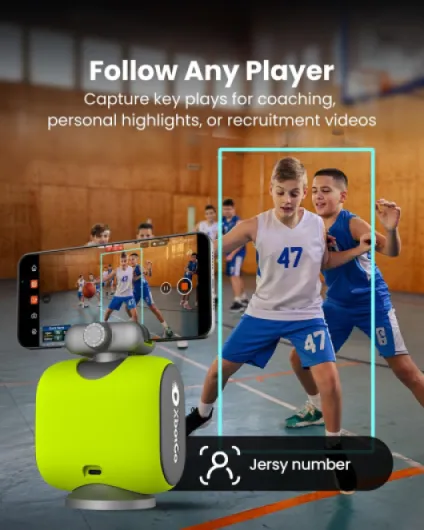
Where it clearly struggles more is very fast, close action like ice hockey along the near boards, as one of the Amazon reviews mentioned. If the gimbal angle and zoom are not set right, it can miss action that happens closer to the camera. Also, the FollowMe mode (tracking a jersey number) is cool in theory, but the documentation is vague, and finding the setting the first time was annoying. Once it’s running, it does work, but it’s not some perfect player isolation tool. Overall, performance is good enough for parents and coaches who want practical footage, but if you expect TV-level tracking, you’ll be disappointed.
What this thing actually does (beyond the marketing buzzwords)
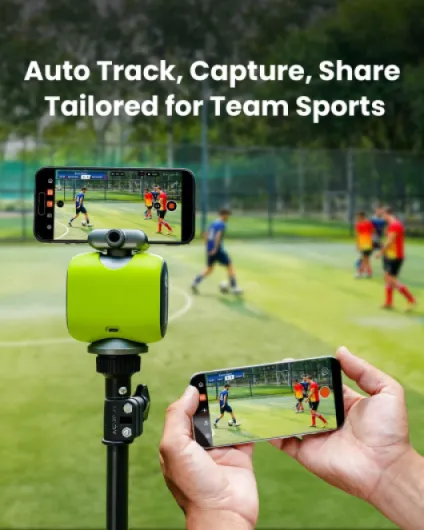
In practice, the XbotGo Chameleon is basically an AI tracking head with a built-in 4K camera and a phone app doing most of the brains and streaming. You mount it on a tripod, connect it via Bluetooth to your phone, pick the sport (soccer, basketball, etc.), and it tries to follow the ball or a selected player, depending on the mode. The footage can be recorded in 4K MP4, and you get 20 GB of free cloud storage, which is enough for a handful of full games before you need to clean up or pay for more.
The key features I actually used regularly were:
- Auto-tracking of the play for soccer and basketball.
- Basic FollowMe mode where you focus on a specific player (jersey number).
- Live streaming to YouTube/Facebook for grandparents and friends who can’t come to the game.
- Remote monitoring from another phone/tablet, which is handy when the camera is up on a tall tripod.
The app is where everything happens, and that’s both the strength and the weak spot. When the connection is solid and you’ve figured out where the settings are, it’s fairly straightforward: you see the live view, can drag the frame to correct the tracking, start/stop recording, and tweak some zoom and framing options. But the learning curve is real, especially because the manual is more of a feature brochure than a real how-to guide.
Overall, as a package, I’d say it’s a specialized tool for team sports, not a general action cam like a GoPro. If you want helmet cam footage or first-person clips, this is not it. If you want a static, wide-angle full-field view, you could technically do that, but then you’re overpaying for AI tracking you’re not using. Where it makes sense is exactly what it’s sold for: recording full games from the stands or the sideline, with minimal babysitting once it’s running.
Pros
- 4K 60 fps recording with wide-angle lens and decent stabilization for clear game footage
- AI tracking that follows the action reasonably well for soccer and basketball once properly set up
- No mandatory subscription and 20 GB of free cloud storage, good for regular use without ongoing fees
Cons
- Poor documentation and non-intuitive app; real learning curve before you get good results
- Live streaming reliability depends heavily on your network and setup, can be choppy or laggy
- Not ideal for very fast, close sports like hockey near the boards; gimbal angle and tracking can miss action
Conclusion
Editor's rating
Overall, the XbotGo Chameleon is a pretty solid tool for people who regularly film team sports and are willing to spend a bit of time learning how it works. The 4K image quality is clean, the AI tracking does a good job most of the time for soccer and basketball, and not having a monthly subscription hanging over your head is a big plus. Once you’ve figured out your usual tripod height, distance, and app settings, it really does let you watch the game instead of babysitting a camera for an hour.
It’s not perfect, though. The manual is weak, the app has a learning curve, and live streaming can be frustrating if your network setup isn’t ideal. For edge cases like hockey or very fast, close action, the tracking and gimbal angle can struggle. You also have to remember it’s not a rugged action cam; it’s a smart field camera that likes a stable tripod and halfway decent weather. If you’re a coach, team parent, or small club that wants regular, usable game footage and is okay tinkering a bit, it’s a good value. If you just want something simple and don’t like messing with apps and settings, a cheaper static camera or even a decent phone on a tripod might suit you better.